

Cult of Mac
  • About
  • Login/Register

Greatest Mac Moment #23: Quick Look

Quick Look

25 Years of Mac
Quick Look. Two words that brilliantly sum up one of the most important and yet least celebrated additions to the Mac experience. When stripped down to basics, Quick Look is merely a document preview. But what a preview! Using it, you can preview the majority of documents on your Mac by selecting them and hitting space, without opening the documents’ parent applications. Quick Look showcases the best of Apple and the Mac, highlighting how it’s sometimes the most obvious things that can be used as the basis for innovation and making the computing experience better.

Craig Grannell:
People use a whole lot of files, and Quick Look has the potential to save Mac users a lot of time every single day, by providing a full and simple preview to a selected file that doesn’t take ages to render, doesn’t require parent apps to open, and is often actually preferable to using apps at all. (I certainly rarely use Office now, preferring to read Word and Excel documents in Quick Look.) It shows how much Quick Look has become ingrained in me that I spent a good ten seconds dumbly hammering space on my iBook yesterday before realizing that, no, it doesn’t actually have Leopard installed.

For me, Quick Look shows what the best thing is about the Mac experience: it’s not about bells and whistles, and it’s not about flashy, showy gimmicks—it’s about doing something in the simplest, most efficient and intuitive fashion, in order to improve the experience for the user. And even though each use of Quick Look may save only a few seconds, it’s often the little things in the Mac user experience that leave the biggest impressions.

Leigh McMullen:
It’s hard to image that a simple OS feature could be considered one of the top Mac moments of the past 25 years. Nevertheless, Quicklook is truely a game changing feature, all the more so for its incredible subtlety. The implementation is so Apple. Take a feature (document preview) and make its implementation so seemless that it disappears. It’s like two-finger scrolling on Macbook Pro trackpads, you don’t even notice you’re doing it.

If you work with a lot of documents and doubt this feature’s importance, take the Tiger challenge: try using 10.4 for a day. You’ll be banging on that space-bar with so much  frustration your colleagues will think you’re playing Quake.

viagra
free viagra
buy viagra online
generic viagra
how does viagra work
cheap viagra
buy viagra
buy viagra online inurl
viagra 6 free samples
viagra online
viagra for women
viagra side effects
female viagra
natural viagra
online viagra
cheapest viagra prices
herbal viagra
alternative to viagra
buy generic viagra
purchase viagra online
free viagra without prescription
viagra attorneys
free viagra samples before buying
buy generic viagra cheap
viagra uk
generic viagra online
try viagra for free
generic viagra from india
fda approves viagra
free viagra sample
what is better viagra or levitra
discount generic viagra online
viagra cialis levitra
viagra dosage
viagra cheap
viagra on line
best price for viagra
free sample pack of viagra
viagra generic
viagra without prescription
discount viagra
gay viagra
mail order viagra
viagra inurl
generic viagra online paypal
generic viagra overnight
generic viagra online pharmacy
generic viagra uk
buy cheap viagra online uk
suppliers of viagra
how long does viagra last
viagra sex
generic viagra soft tabs
generic viagra 100mg
buy viagra onli
generic viagra online without prescription
viagra energy drink
cheapest uk supplier viagra
viagra cialis
generic viagra safe
viagra professional
viagra sales
viagra free trial pack
viagra lawyers
over the counter viagra
best price for generic viagra
viagra jokes
buying viagra
viagra samples
viagra sample
cialis
generic cialis
cheapest cialis
buy cialis online
buying generic cialis
cialis for order
what are the side effects of cialis
buy generic cialis
what is the generic name for cialis
cheap cialis
cialis online
buy cialis
cialis side effects
how long does cialis last
cialis forum
cialis lawyer ohio
cialis attorneys
cialis attorney columbus
cialis injury lawyer ohio
cialis injury attorney ohio
cialis injury lawyer columbus
prices cialis
cialis lawyers
viagra cialis levitra
cialis lawyer columbus
online generic cialis
daily cialis
cialis injury attorney columbus
cialis attorney ohio
cialis cost
cialis professional
cialis super active
how does cialis work
what does cialis look like
cialis drug
viagra cialis
cialis to buy new zealand
cialis without prescription
free cialis
cialis soft tabs
discount cialis
cialis generic
generic cialis from india
cheap cialis sale online
cialis daily
cialis reviews
cialis generico
how can i take cialis
cheap cialis si
cialis vs viagra
levitra
generic levitra
levitra attorneys
what is better viagra or levitra
viagra cialis levitra
levitra side effects
buy levitra
levitra online
levitra dangers
how does levitra work
levitra lawyers
what is the difference between levitra and viagra
levitra versus viagra
which works better viagra or levitra
buy levitra and overnight shipping
levitra vs viagra
canidan pharmacies levitra
how long does levitra last
viagra cialis levitra
levitra acheter
comprare levitra
levitra ohne rezept
levitra 20mg
levitra senza ricetta
cheapest generic levitra
levitra compra
cheap levitra
levitra overnight
levitra generika
levitra kaufen

About the author

Craig Grannell

Craig Grannell is Cult of Mac's designer and an occasional contributor. He also runs iPhoneTiny.com, a Twitter-driven reviews site for iPhone apps and games. Follow Craig on Twitter @CraigGrannell and visit his website, Snub Communications.

Email the author | Read more posts by Craig Grannell.

3 comments

    P.S. Only 23 weeks until the Superbowl and (we hope) an incredible 25th Anniversary product announcement from Apple.

    My bet: The Dallas Cowboys: 24 - Any other team: 14. (I’ve learned my lesson trying to anticipate Apple products, I’m sticking to handicapping football)

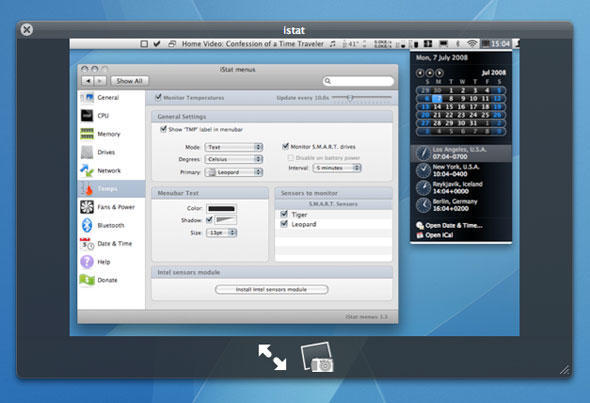
    I just want to know what that calendar application is? I’ve been looking for something like that for some time.

    The calendar/world clock thing is part of iStat menus, which I reviewed for Cult of Mac back in July: http://cultofmac.com/six-of-the-best-mac-os-x-menu-extras/2234
