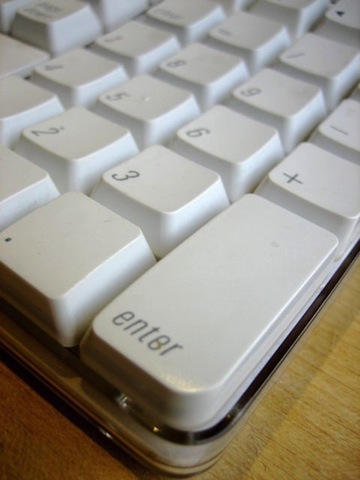
Last month, after a couple of eggnogs at the office, I drenched my keyboard in a cup of coffee. Kind readers suggested running it through the dishwasher. Of course, putting keyboards in dishwashers is the kind of thing you read on the internet all the time, but never believe it actually works.
So, skeptical that it would work, I tried it myself.I’m happy to report that running a filthy, coffee-stained keyboard through the dishwasher works great. The keyboard is spotless, and it works perfectly.
Feel me: dishwashers make keyboards better than new.
Full procedure after the jump.
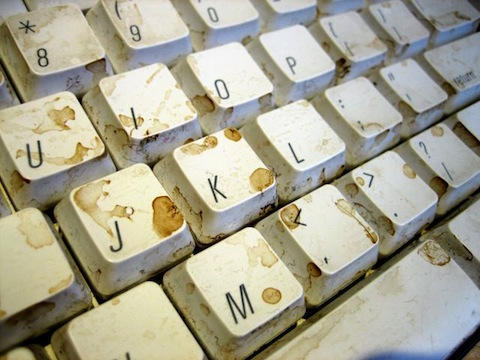
As described in a previous post, I drenched a keyboard in a cup of coffee. The coffee eventually dried, and the keyboard still worked OK, but I decided this would be a good time to test the dubious theory that keyboards can survive a trip through the dishwasher.
I’ve previously dismantled Apple keyboards like this after coffee and beer spills, and they’re a pain in the ass. There are tons of screws, and these keyboards are full of fiddly little silicon cups below the keys. I always lose a couple before I put them back together. And then the keyboard still doesn’t work, and I’ve wasted hours titting about.
The dishwasher treatment seemed like a good shortcut. But I was skeptical it would work. Especially this model, which has a couple of USB ports on the back.
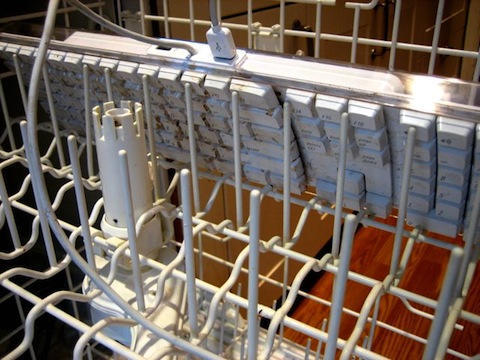
I loaded the keyboard into the top rack of the dishwasher, the keys facing down. I read somewhere on the internet that you’re supposed to wrap the USB plug in plastic to protect it. I was too lazy, so I plugged it into one of the two USB ports on the back instead. I thought about protecting the USB ports also, but again, couldn’t be bothered.
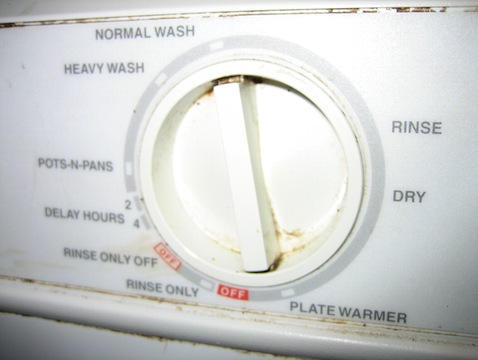
Turn the dial to the “Normal Wash” setting. Do not load dishwashing liquid.
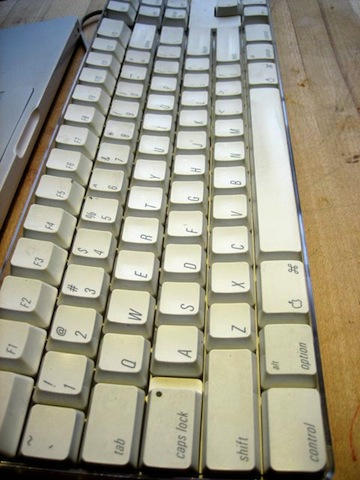
The keyboard emerged full of water, so I left it upside down for a couple of days to drain. This was only partially successful: There was still quite a lot of water trapped between the keys. So I put the keyboard next to a window and left it another few days in the hope the water would evaporate out.
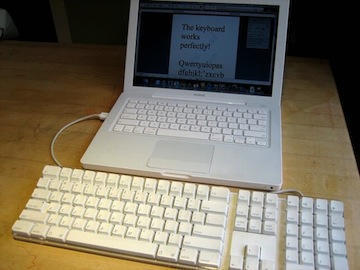
Five days later, and totally expecting the keyboard not to work, I plugged it into my MacBook. I was flabbergasted to find it actually worked! I tested all the keys, including the function keys, volume controls, and number pad. Everything works, including the LED under the caps lock and number lock keys.
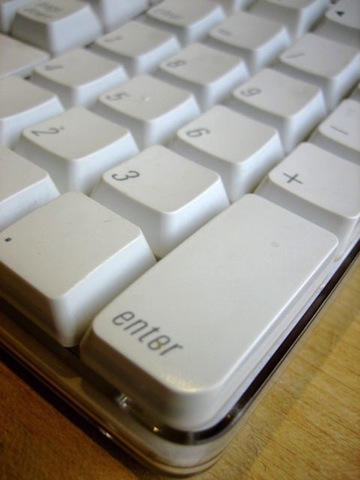
Look at how offensively white it is — it actually hurts your eyes.
So there you have it: Running a keyboard through the dishwasher actually works.



87 responses to “It’s Official: Dishwashers Are Great For Cleaning Keyboards”
Hmm. I wonder if I dare try this with my filthy Apple Wireless Keyboard (not the shiny new metal one, but the one that looks like yours)…
Dare me? ;-)
Look like you need to put the dishwasher’s knob in the dishwasher.
If I could put my MacBook in the dishwasher I’d be really happy :P
Surprisingly this also works well on MacBooks. Shiiiiney new looking.
Do you now even read what you wright before posting it? A few mistakes is ok, were all human, but there are always seriously misspelled words, and messed up code in every one of the posts on here. Check your damn writing, because it makes you look really unprofessional. Thanks.
Next I want to see you test it with a bluetooth keyboard. :-)
Wow, hmm, would it work with the newer Apple keyboards too?
Corrections for Zaraden, above… a) “wright” should be “write”, b) “few mistakes is” should be “few mistakes are”, c) “were” should be “we’re”, and finally d), no comma after “words”. Otherwise, comment away!
Thank you, “Zaraden,” you made my day.
Zaraden!?! I hope you were being ironic(al)
We’re all human…
Seems like a much better method than my old one. I would take out all the keys, clean the inside with a toothbrush and put the keys in a bag with soap and water and shake the bag around for twenty minutes or so. It worked well but was very time consuming. And then of corse I had to put all the keys back in the right place, and my god got ahold of one so the ‘help’ key was all torn up. But now I have a shiny aluminum wireless keyboard, so there’s no way you’re getting me to put that in the dishwasher, no matter how dirty it is.
Yeah dude… your dishwasher is disgusting. Get to scrubbing.
Don’t put an aluminium keyboard in your dishwasher. The temperature + residual chemicals from previous washes will cause a heap of discolouring, surface piting, and general nastyness on the aluminium parts…
I’m actually pretty surprised, I have 2 of those apple keyboards that I tried to clean them by taking the keys off and scrubbing the bottom, then putting the keys in a plastic bag with some cleaning solution. After I had finished I let the keyboards dry for a few days, then I tried them and only about half of the keys worked.
Ah, but can I use my dishwasher’s heated dry cycle? Hmmmm, where did I put that old keyboard?
I too have washed multiple keyboards in the dishwasher. Take note of the article, use NO dishwashing detergent. And copious drying (3-5 days) will be necessary. Even so, be warned, about every fifth or sixth keyboard came out DOA.
Every fifth or sixth keyboard!? Are you a man or an octopus?
Washing electronic equipment in a dishwasher is nothing new. Restorers of vintage electronic equipment have been doing this for years and years. For gear that has spent years in a smoke-filled environment — it may be the only way to remove the thin patina of tobacco the clings to every surface.
Of course, certain electronic components may be hydroscopic, so drying the equipment after washing is important. Restorers often bake washed equipment in an oven set to a low temperature (below 200 degrees) to ensure it is thoroughly dry. Thorough drying is also important to avoid later corrosion of contacts.
You don’t need to run through a full cycle to get this effect. Even a short rinse cycle may be sufficient to clean a piece of equipment.
I can’t get past that nasty dishwasher…dude….really…..
You need to run your dishwasher thru a dishwasher….
This is an old trick that I’ve heard used (but never been brave enough to try) since the mid 90’s, at one point I was told that when the keyboards leave the factory, they’re given a quick rinse thru what is essentially a large commercial dishwasher to get any of the plastic processing residue off.
Good show
Our no-budget computer program up at the local senior center has been doing this with donated keyboards for several years. Ours is an industrial cafeteria dishwasher – one and a half minutes at 195 degrees fahrenheit. We dismantle the keyboards but do not remove keys. Whatever industrial soap is used is used; we have no control of that. We have run a couple hundred boards. We have never lost a living board; not one. Of dead boards consigned to the dumpster, we get back two out of three. Yes, dry them out. We set them in front of a forced air heat register for a couple of hours.
For the non-believers, take an old keyboard and give it a try. Better yet, give a dead keyboard a try. We have also tried this with dead motherboards. We get back maybe one in three. Our guess is that the crap from leaking capacitors is getting washed out. If so, you are likely going to lose the board again soon.
Ok, you can wash it. But the question is: will it bend?
Yeah, dude, clean off your dishwasher!!! DISGUSTING!
My wife spilled a Diet Coke into her eMac’s keyboard. Someone on the inter-tubes told her to pop it in the dishwasher. My 13 years experience in electronics manufacturing said ‘Huh? No way. Uh-uh. Total BS.’ She did anyway, and guess what… I had to buy her a new keyboard. Totally bricked. But it was nice and clean. So listen up: It’s called a ‘dish’ washer, not a keyboard washer. DON’T DO IT! …unless you want to buy a new keyboard. Then again, a new keyboard may be better than a sticky keyboard. It’s certainly better than a bricked keyboard.
A friend of mine once spilled plain water on his keyboard. It shorted the contacts underneath the keys and never worked again. Wasn’t an apple keyboard though, don’t know if it makes a difference.
I can’t seem to part with my Pro Keyboard circa 2000. I’ve skipped the dishwasher, all I do is run it under warm water in the sink, and give it a good scrub with a brush. Turn it upside down, and let it drain, then in the summer it sits outside in the sun for a few hours. Good as new.
older macs rulez! but the new ones sucks! really!
sure dont you piss the keayboard??
The important thing to consider is that this will only work on keyboards that have protected membranes and properly coated circuit boards. If you spilled something on the keyboard and it stopped working, theres a good chance that a trip in the dishwasher won’t do it any good. Any exposed traces on the internals can easily corrode when exposed to too much water, whether it’s from a coffee or from the dishwasher itself.
As far as keyboards made of Aluminum (whatever that is ;-) remember that it’s a VERY reactive metal, and the main component of dishwasher detergent is a low pH compound. Aluminum should NEVER go in the dishwasher, unless you want unsightly corrosion of the metal. This goes for pots and pans, and certainly keyboards.
wow this is cool have seen videos about this be for but didn’t wanna risk it im told this will not work with wireless keyboards because of the transmitters and i would say any very low powered device that does not have a transmitter in it will still work after the dishwasher and drying
This is a very risky thing to do. The latest Apple keyboards (prior to the aluminum keyboards) have two flexible plastic membranes that run the full length and width of the keyboard. These two membranes are separated by a very small amount. When a key is pushed, the area on the membranes beneath the key make contact, thus the key is sensed. By removing a gazillion little screws, you can remove the two membrane. Wash them very carefully and then reassemble things after everything is dry.
If these two membranes get stuck together anywhere, some or all of the keys will not work. The chance of this happening in the dishwasher method is pretty good.
I actually had a iMac that got flooded in my basement when the sump pump didn’t work. It was submerged in about 10 inches of water. I quickly removed it from the water and I opened up the bottom plate and put a fan on it. I let it dry for about 1 month. Turned it on and worked fine. I was shocked. This iMac is still running like a champ.
Great walkthrough!
Working in IT I’ve done this to dozens of nasty keyboards that were destined for the trash bin. Once they’re covered in coffee and sticky soda, you can’t give them to a user. The amount of time and work it takes to clean the keyboard costs more (in resources) than the cost of a new one. I figure, if I’m going to throw it out anyway, I may as well try washing it. Beedevil’s experience mirrors my own. One out of every five or so will come out DOA.
Also important to notice:
Only use the top rack, being further from the jets, the keyboards don’t take quite as much abuse.
Don’t use the heated drying cycle. This will melt your keyboard.
Thanks again for the walkthrough.
/Aaron
I’m typing this comment with my sparkly clean white keyboard. It worked like a charm.
My keyboard (same as yours) wasn’t quite as disgusting looking but it did have heaps of grime, crumbs and stuff under the keys…. all of which are now gone :)
Thanks,
Benjy
I managed to spill something sugary on my new aluminum thin keyboard and had the sticky key problem. I ended prying off the keys gently then using a cotton bud with a bit of cleaning solution to clean the mechanism and the back of they keys (keyboard was unplugged first). All keys are now working great. I would definitely not put it in a dishwasher!
Buy a zCover @ http://www.zcover.com. Periodically remove the cover and clean both sides with glass cleaner and a soft cloth. Prevention is worth an pound of cure.
In have washed loads of old pc keyboards at work with the dishwasher.They are either old dells, cherrys or even new HP ones.All are ps2 ones and ive never bothered to seal up the plug ends.But I want to try a USB keyboard next, i might seal the plugs first.
I let them dry for at least 7 days, and I use detergent too, Ive never had any problems.
All that crud of hair and crumbs comes right out :)
I can confirm this works!!
I spilled Coffee on my Apple Aluminum Wired Keyboard about six months ago
It was just collecting dust, I saw people doing this on Youtube and decided to
give it a shot since my keyboard was a goner anyways.
Threw this keyboard in the dishwasher without taping or covering the USB ends
Safe to say I am now using the this keyboard as my daily keyboard.
(Dont try to pry out the keys and clean the underneath because you can break
some of the hinges if you dont know what you are doing)
Thank you for sharing it ! Very nice, Peace
Excellent information, thank you very much. Congratulations on the quality of the website. Greetings from Chile.Great little piece. Enjoy your stuff.
I can also verify this works, the worst part is waiting for it to dry, I set my wife’s keyboard up in front of a fan sitting it on one corner with the keys down and rotated it several times a day, still took almost two days but it worked, helped that I had a spare keyboard for her to use in the interim.
Would it speed up the drying if I put the keyboard in the oven after it comes out of the dishwasher?
Just took my college son’s Powerbook G4 apart because beer and god-knows-what had disabled the keyboard. I vacuumed the inside (there were brown rice grains among lots of hair & other sticky things) and removed the keyboard assembly, which I tossed in the dishwasher (upper rack, normal wash, no detergent, no heated dry). It looked so good, I ran it threw a second time (’cause if once is good, twice is mo-better). Used the nozzle on my air compressor to chase the leftover water out of the keyboard and then set it on top of the HVAC vent for 24 hours. Re-installed the keyboard and re-assembled the G4 (PITA) and it works great now. Who’d-a-thought-it!!!
Why not microwave the keyboard to dry it :)
Why not microwave the keyboard to dry it :)
you should put your dishwasher in the dishwasher too ;)
I followed the following instructions – upside down, top rack, no soap, quickest cycle and taped over the USB ports/USB cable. After the wash cycle I left it to dry upside down over a towel and eventually moved it outside on a breezy spring day. The keys are white and clean…and I’m typing on it right now – 48 hours after the wash! Thanks for the tip