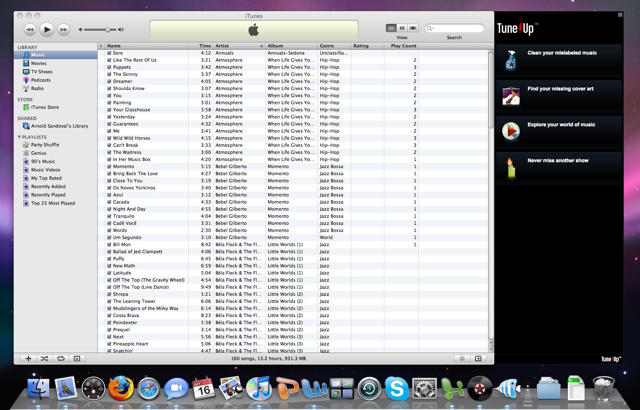
Tune Up, already a popular iTunes plug-in for Windows, makes its OS X debut on Thursday, promising to automagically bring order to your hopelessly unorganized iTunes Library and bestow upon you missing cover art, concert information, music videos and news about your favorite artists, all without your ever having to leave iTunes.
Nicely presented to a snappy backing track in the video above, Tune Up will first analyze your library, presenting you with information on all the megabytes of music you have labeled Track 1, Track 2 and so on, all the Unknown Artists, Unknown Albums and missing information keeping your database from being fit to be housed in the Library of Congress.
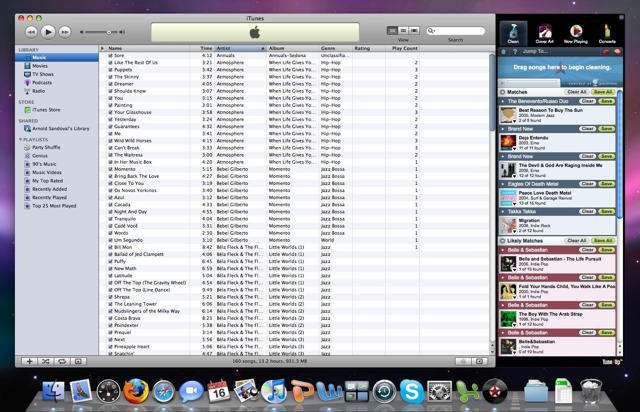
Once you’ve been shamed to learn how sloppy you’ve been about importing music onto your Mac, Tune Up gives you the chance to clean up your mess and the automagical stuff really starts to happen. Using a secret forensics algorithm, the program takes an “audio fingerprint” of each mislabeled track and compares it to the 90 million song Gracenotes® Global Media Database and automatically fills in the missing information.
“All of us here are entrenched in music. We’re cranking tunes all day,” says CEO and founder of Tune Up Media, Gabriel Adiv. “We’re also the type of people who want all of our cover-art, don’t like missing concerts and spend hours online looking for YouTube videos, news, and merch from our favorite artists.”
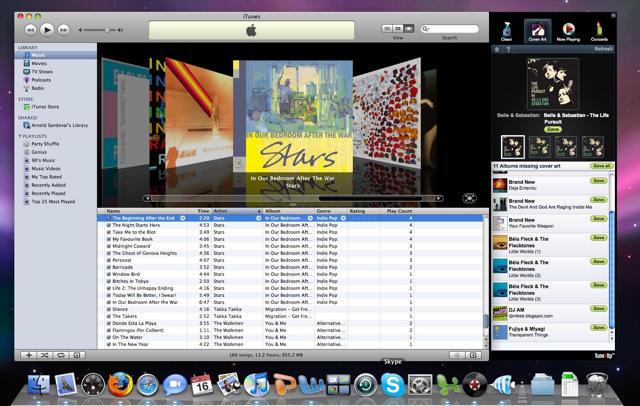
Once your library has been cleaned and all your cover art rendered, Tune Up knowingly displays upcoming local concerts for every artist in your collection, and fetches YouTube videos, Google news and Wikipedia bios related to any playing track. The best part of this feature is that it’s built in – no filling out extra forms or compiling lists of favorite artists or albums from scratch.
For a limited time, a full-featured version of Tune Up is available with 500 “cleans” and 50 cover art “finds” for free. “Tune Up Gold” provides unlimited cleans and cover art finds for a one-time fee of $19.95 or an annual subscription of $11.95. The OS X version launching Thursday requires Leopard, but the company plans a release supporting Tiger soon, as well as support for Windows Media Player and AOL’s WinAmp later in 2009.




32 responses to “Meet Tune Up – Your Music Collection’s New Best Friend”
Certainly sounds an interesting app. Unfortunately though, the download is for an installer application which demands your admin password immediately and won’t even tell you what it’s going to install. Apple provides installer packages for a reason people!
I gave it a shot and here are my thoughts.
First of all I really like the idea behind the program, and if you got a REALLY messed collection it might give a good start.
But if you feel like you have your collection somewhat under control, it does not seem to be the best application (and I will go back to manually labour after this comment).
The program definitely do not like “Best of collections”. I got a lot of those, and TuneUp seriously messed up the results. For instance I had a 2 CD album called “Best of Bowie”. This album was tagged nicely and to me it was looking and sorted like the original. For the fun of it I gave Tunebite a shot at it, to see if there was something wrong. One of the CD’s was suddenly converted into a complete Italian CD. And the rest of the numbers was split between two other CD’s. I have no clue where those informations were from, but definitely a hit and miss. Same thing happend with a few other “Best Of”s.
After my first analyze TuneUp told me I had 42% clean tracks, so 58% were not clean. I am supposed to drag my “dirty tracks” to the cleaner sidebar, but where on earth do I find the “dirty tracks”? For some reason I thought it would make a list or something? As I see it, it sounds like you have to drag all your tracks to the sidebar and not just the dirty ones – I mean where can I find the right ones?
Another thing I found really anoying is that the sidebar behaves very Windows like. If you’re inside iTunes you can’t “just drag” into the right locations. Often the sidebar required a click to be the window in focus and then you could drag the tracks inside the sidebar.
I got the spinning beachball of doom quite often.
I love the “extra info” you get when playing a track, a really nice feature.
And although it isn’t the most ugly interface, it could definitely be better integrated in iTunes. Again it feels like leftovers from Windows.
Oh and if you use LittleSnitch on your mac, make sure it’s completely turned off when using TuneUp. In the short amount of time I used it, I granted it access to 35 different locations (and then I gave up).
Def. a great idea – just way too buggy and clumsy for my taste.
Unfortunately, there is an unresolved mac bug which renders the application useless:
Mac: No “connecting”/”not connected” message pages
Symptom:
When launching TuneUp, it should give a message that it is attempting to connect to TuneUp’s servers and another if it is unable to connect. TuneUp shows a white page trying to connect and a “browser” error connection message when it can’t connect.
Cause:
Not implemented yet
Workaround:
None
Anticipated Fix:
B07
Very disappointed so far. Installed just fine, analyzed songs just fine. Went to clean up and it’s a pain in the a** to get the Clean function to actually recognize that you’ve just dropped the songs on it in order to have them cleaned up. Has worked only 1 time after a dozen or so attempts. I can’t suggest buying it if the demo version works this poorly.
Also, untethering it from iTunes if you decide you don’t like it is an absolute pain. Can’t just delete it as with normal Mac stuff. Need to run an uninstall whose location you have to find from somewhere on their forums. Here’s what it says:
“We’re sorry to see you go. TuneUp has an uninstaller which didn’t work on Beta versions.
The uninstaller is located under
/Users/”YourUserName”/Library/Logs/TuneUp Uninstaller.app
Launch that and it will walk you through the steps…”
You gotta figure out which files to zap. Hope I got the right ones. At least it no longer tries to launch TuneUp when I launch iTunes. Couldn’t wait to get rid of it.
Gabe Adiv here, CEO of TuneUp
First off, thanks to Cult of Mac for the write up.
I’ve read through some of your comments/feedback and wanted to address some of them personally:
In terms of having to enter your admin password to install the software, the admin password is required to install libs, which even the Apple installer tool will ask for. We tested the Apple Package Maker, but encountered some issues that prevent us from using it in our more complicated install.
We’ve received feedback similar to @Thomas’s when it comes to making the Analyze feature more useful and matching on Best of Albums. Resolving these two issues is on the top of our list for future updates.
@Barryct – Sorry to hear about your issues with the drag and drop. We’d love to help you resolve this – feel free to visit our support forums [http://www.tuneupmedia.com/sup…] or email me directly at gabeaATtuneupmediaDOTcom.
Finally – the uninstall issue is being worked on as we speak. At the tip top of our list. If you’re running into issues uninstalling TuneUp, our Support Team is also very responsive. They can be reached at mac_supportATtuneupmediaDOTcom.
uninstalling this is the biggest pain in the ass ever. don’t bother until they come up with an uninstaller that actually works. this is ridiculous.
It shouldn’t even need an uninstaller. Windows’ stuff uses uninstallers. Mac stuff just deletes. Or should. In 23 and a half years of using a Mac, I cannot recall having to run an uninstaller even once (before this).
Well, got through the could not connect problem, but little else seems to work as it should, as detailed above. Let me know when it’s out of beta. Sounds like a promising program.
I installed it yesterday and it worked fine on some orphan tracks. It also told me 99% of my 3000+ tracks aren’t clean, but it doesn’t say why, which makes it difficult for me to decide if it’s worth my time to submit them for cleaning. I’m guessing all the CDs I’ve uploaded are missing cover art and since I don’t stare at the screen while music is playing I consider that wasted storage.
Today when I loaded the app I got an “unable to connect” screen for a long time and then the spinning beachball. Twice. After dragging the icon to the Trash, I’m glad I checked out the comments here to find out there’s an uninstall routine. Thanks to Mac for providing the folder.
Hi Gabe,
No need for the uninstaller just package those files into the App. Unfortunately the interface was unusable and the overall experience was well-below par so for that reason… i’m out.
Dave.
What a pest of an application. I couldn’t wait to delete it… and then realised I couldn’t! Thanks for the tip here directing me to that obvious uninstaller, and wow, what a pile of files it has infiltrated into my libraries. Nope, never again.
What a pest of an application. I couldn’t wait to delete it… and then realised I wasn’t able to! Thanks for the tip here directing me to that ‘obvious’ uninstaller, and wow, what a pile of files it has infiltrated into my libraries. Nope, never again.
I agree with others. What a pain to get rid of. The app worked but it was so in my face every time I used iTunes that it had to go. Clean up the interface and make it less obtrusive and you will have something. Until then…no thanks.
any advise on which files you need to zap?
What a total waste of time and money. I now have 80gigs of incorrect tags and artwork. Can somebody please advise how to effectively delete this program from a Mac? Developers really ought to step up and offer some kind of help …