Up next in 10



Buy on Amazon (affiliate link): https://www.amazon.com/dp/B0D6C6F2L8/?tag=cult087-20
Review on Cult of Mac: https://www.cultofmac.com/reviews/5k-desktop-monitor-asus-proart-5k-pa27jcv-review
More Apple news: http://www.cultofmac.com
Produced by Extra Ordinary for Cult of Mac
Music composed by Will Davenport, arranged by D. Griffin Jones
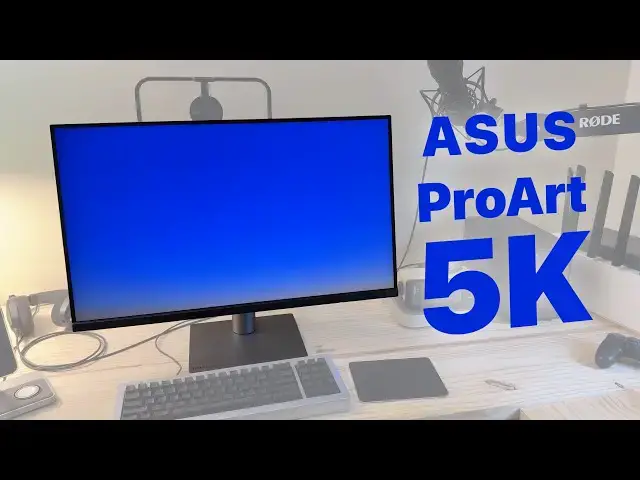
#Asus new ProArt 5K desktop #monitor costs just half of what you'll pay for #Apple #StudioDisplay but offers many of the same features. The Asus ProArt 5K PA27JCV boasts the same 27-inch screen, Retina resolution, standard framerate and P3 wide color gamut as Apple's midrange monitor. It also comes with a built-in USB hub and KVM, which proves great if you still use a few USB-A accessories or flash drives.
Chapters:
0:00 Introduction
1:30 Design
4:16 Dynamic Dimming
5:25 Picture Quality
6:46 Ports & KVM switch
7:38 Quirks & Features
9:07 Verdict
Follow us!
Threads: https://www.threads.net/@cultofmac
Show More Show Less View Video Transcript
0:00
there's a new desktop monitor in town
0:02
for Mac users the Asus Pro art 5K pa27
0:08
jcv very catchy name has very similar
0:11
specs to Apple's Studio display at just
0:15
half the cost let's take a
0:19
look since the early 2010s Apple has
0:21
gone all in on retina displays screens
0:25
with double or even triple standard
0:27
pixel density that means the pixels are
0:29
so small your eyes can't discern each
0:32
individual one so text images videos all
0:35
look super high resolution and super
0:38
crisp apple builds retina displays into
0:40
all their products from the iPhone iPad
0:43
Apple watch MacBook iMac and more but
0:46
the rest of the industry hasn't followed
0:48
an Apple's footsteps so if you have a
0:50
Mac Mini or a Mac Studio or you just
0:53
want a desktop display to dock to your
0:55
MacBook your options are limited you
0:58
want at least a 4K screen at 24 in a 5k
1:02
screen at 27 in or a 6K screen above 30
1:06
in Apple's own Studio display and pro
1:09
display xdr are priced way above what
1:11
most normal people are willing to spend
1:14
which makes any thirdparty retina
1:15
displays a hot commodity among Mac
1:18
enthusiasts enter the Asus Pro art 5K
1:23
pa27 jcv and rest assured I'm not going
1:26
to keep calling it by its full name
1:28
throughout the entire video its design
1:30
is mostly pretty handsome it's sleek and
1:33
black with these silver accents it
1:35
should blend in nicely with any Mac
1:38
setup the slim black bezel nicely frames
1:41
and emphasizes the gorgeous 27in screen
1:45
4K panels are a dime a dozen at this
1:47
size but a 5k screen gives it a
1:50
resolution of 2560 by 1440 pixels making
1:55
it a retina display compared to a
1:57
standard 1080p screen it has a more
2:00
space horizontally and vertically
2:02
there's no aluminum or glass though the
2:05
display is clad entirely in plastic if
2:08
you grab the display with two hands and
2:10
flex it will loudly Creak at half the
2:13
price of a studio display the savings
2:16
have to come from somewhere along the
2:18
bottom right of the display you'll see a
2:20
row of buttons the display is almost
2:22
entirely controlled with one button on
2:24
the far right which clicks and acts like
2:27
a four-way d-pad for navigating the menu
2:29
menu when you first summon this menu the
2:32
other five buttons can be used as
2:34
shortcuts to the other features but they
2:36
aren't labeled you have to match their
2:38
function to the list shown above the
2:41
button click the menu button a second
2:43
time to actually bring up the full menu
2:46
It's needlessly Complicated Asus
2:48
reassured me that their customers like
2:49
these buttons but they didn't ask me I
2:52
think they're pointless the arm is solid
2:55
and Incredibly sturdy it smoothly slides
2:58
up and down adjust able height comes at
3:00
no extra cost imagine that I really like
3:04
sliding it up to hide the camera mount
3:06
that I keep behind it and sliding it
3:08
down when it's time to record a video or
3:10
a live stream it also tilts forward and
3:13
backward much more than other monitors
3:15
I've used and even swivels left and
3:17
right the raising lowering tilting and
3:20
swiveling all feels really solid it's
3:23
nice and smooth and the display stays
3:25
put wherever you set it the weak point
3:29
is the rotation
3:30
you can put the monitor in a portrait
3:32
orientation which might be useful if you
3:34
have it in a large multi-display setup
3:37
but because it freely rotates anywhere
3:39
between 0 and 90° it wobbles a lot if
3:44
you just touch it on the corner it
3:46
wobbles dramatically and might even
3:48
settle on an angle that's slightly
3:50
off-kilter I really wish you could lock
3:52
it out of rotating nobody wants their
3:54
monitor at 6° you either want it at zero
3:58
or you want it at 90
4:00
imagine if the connector didn't rotate
4:02
at all it was fixed in place but the
4:05
monitor could be clipped onto it in
4:07
either orientation that would solve the
4:10
problem or at the very least rotating
4:12
the monitor should take much more Force
4:15
than it does every display has that one
4:17
setting you need to turn off out of the
4:19
box on TVs it's usually something
4:22
related to motion smoothing the Asus Pro
4:25
art 5K has a feature called Dynamic
4:27
dimming that you'll want to turn off
4:29
right away Dynamic dimming tries to make
4:31
bright parts of the screen extra bright
4:34
OLED displays do this best because each
4:36
pixel is individually lit but this is
4:39
not an OLED display the display is lit
4:42
in large vertical sections which makes
4:44
everything above and below the content
4:47
overblown Apple's own mini LED displays
4:51
have this problem too it's called
4:52
display Bloom it's most noticeable if
4:55
you have a completely black wallpaper
4:57
with a single small white window in the
5:00
center of the screen you can see the
5:02
space above and below the window isn't
5:05
as dark as the rest Dynamic dimming also
5:07
washes out other white areas of the
5:09
image which you can see affecting the
5:11
icons in the dock to turn off this
5:13
feature open the menu by clicking The
5:15
prominent button on the right click it
5:17
again to actually open the menu click
5:20
down to the settings tab and here you
5:22
can turn off Dynamic dimming Once you
5:25
turn off Dynamic dimming the picture
5:27
quality is fantastic it's bright and the
5:30
colors pop it doesn't get quite as
5:32
bright as the studio display reaching
5:34
only 400 nits instead of 600 but you can
5:37
still see it clearly even on a sunny day
5:40
with lots of light pouring into my
5:42
office in Ohio that happens at least
5:46
several days in a year it technically
5:48
meets the minimum requirements for
5:50
certified HDR or high dynamic range but
5:54
instead I would think of it as being a
5:56
really nice SDR panel or standard
5:59
dynamic range if you enable HDR in Mac
6:02
OS system settings HDR videos will be a
6:05
little brighter but the rest of the
6:07
screen will be all washed out I have the
6:09
display set to the DCI P3 preset with
6:12
brightness at 100% I have my Mac set to
6:15
the display P3 color profile and I've
6:18
been very impressed colors are vibrant
6:22
blacks are super dark cheap matte
6:24
displays can look blurry and struggle
6:27
with contrast the Asus Pro art 5 5K has
6:30
a special Lux pixel coding that removes
6:34
Reflections while minimizing the side
6:36
effects it's still incredibly crisp you
6:38
can make out each individual pixel if
6:41
you get close enough and as I mentioned
6:44
the colors really stand out the pro art
6:46
5K also packs a variety of extra ports
6:49
it can act as a USB hub and a KVM switch
6:53
between two computers setting it up is a
6:55
little confusing the two USBC shaped
6:58
ports now next to the HDMI plug let you
7:01
use the two usba ports and the two other
7:05
ports on the bottom but even if you're
7:07
only using the display with one computer
7:09
you can't use either of these USBC ports
7:11
for plugging in peripherals all they do
7:14
is connect your computer to the hub but
7:17
you can plug each of these into a
7:19
different computer to share the
7:21
peripherals plugged into the four other
7:23
ports I've had some spotty results with
7:25
the plugs for some reason my keyboard
7:27
doesn't like the USBC port on the bottom
7:29
but I also used it to charge up an
7:31
iPhone and the usba a ports to charge
7:33
and sync some old iPods I like how Apple
7:36
displays have the ports facing out the
7:38
back rather than out the bottom it's
7:41
easier to see them and plug things in
7:43
and manage the cables but it is more
7:46
expensive to make them that way here at
7:48
the end is a quick lightning round of
7:50
various quirks and features because the
7:52
display supports multiple inputs you can
7:54
see multiple devices at once it supports
7:57
picture in picture all on with tiling
8:00
two or three inputs side by side that
8:02
can be handy if you're working with
8:04
multiple computers and only have one
8:06
display but setting it up is a little
8:08
clunky because it's buried in the
8:10
onscreen menu and making any changes
8:13
blacks out the screen for a few seconds
8:15
it technically has an ambient light
8:17
sensor that should in theory match the
8:19
brightness and color temperature of the
8:21
room I found that it vastly
8:24
overcompensated making the display far
8:26
too dark and yellow so I immediately
8:29
turned it off compared to the studio
8:31
display you're missing a built-in camera
8:33
the Asus Pro art has a built-in speaker
8:36
but it's kind of terrible when you wake
8:39
your Mac up from sleep it takes about 5
8:41
seconds for the image to appear on the
8:43
screen it's just a beat slower than
8:45
typing in a password from muscle memory
8:47
or waiting for unlock with Apple watch
8:49
to do its thing when your Mac goes idle
8:52
the monitor shows a very pleasant black
8:54
screen with a subtle USBC no signal
8:57
message that stays on for just a moment
8:59
before it goes idle too but weirdly over
9:02
HDMI the same message appears in a harsh
9:06
bright blue so in conclusion if money is
9:08
No Object the Apple Studio display is
9:11
still the best choice for a Mech because
9:14
of all the premium features the extra
9:16
10% that makes Apple products that much
9:19
nicer but money is rarely No Object if
9:23
you want the same super high resolution
9:26
desktop screen size and similar industry
9:29
standard color accuracy without burning
9:31
a hole in your pocket we have a new
9:34
second place princess if you want an
9:36
adjustable stand and a matte finish
9:38
you'd really be spending $22.99 on the
9:42
studio display nearly three times as
9:44
much and I'm told it also comes with a
9:47
great 3-year warranty with a rapid
9:50
replacement policy it's a great 5K
9:53
desktop monitor at an unbelievable price
9:57
if you'd like to purchase it you can
9:58
click our affiliate link here or in the
10:00
video description remember to like And
10:03
subscribe I'm deerin Jones with Cult of
10:06
Mac
10:08
[Music]
#Consumer Electronics
#Product Reviews & Price Comparisons
#Technology News