Up next in 10



More Apple news: http://www.cultofmac.com
Welcome to Episode 4 of iSetups! In this video we’ve got setups from Guglielmo Costanti, Madhu Renduchintala and Powi Hart.
For a full list of products featured check out the links below along with links to my setup lists.
I’ve tried to find the exact or as similar as possible products within Amazon.
Guglielmo Constanti: https://kit.com/SteSmith/isetups-episode-4-guglielmo-costanti
Madhu Renduchintala: https://kit.com/SteSmith/isetups-episode-4-madhu-renduchintala
Powi Hart: https://kit.com/SteSmith/isetups-episode-4-powi-hart
Cult of Mac office setup: https://kit.com/SteSmith/cult-of-mac-...
My personal home setup: https://kit.com/SteSmith/my-home-setup
———————————————————————————————————————————
// iSetups Submission Instructions //
Video Submission //
Show More Show Less View Video Transcript
0:00
Hey, what's up guys
0:04
Stephen Coles of Mac here, back with episode 4 of iSetups. I'm currently at my home office, which I'm planning to renovate in the next few weeks
0:11
As soon as that's done, I'll make sure to give you a quick tour on this show. But this week we've got three great setups from, let me have a quick look, Powy Hart
0:20
Guillermo Constanti and, I apologise if I butcher this, Madhu Ranchindola. So let's get started
0:26
First up, we've got a killer setup from Powy Hart, who's running with the black and white
0:34
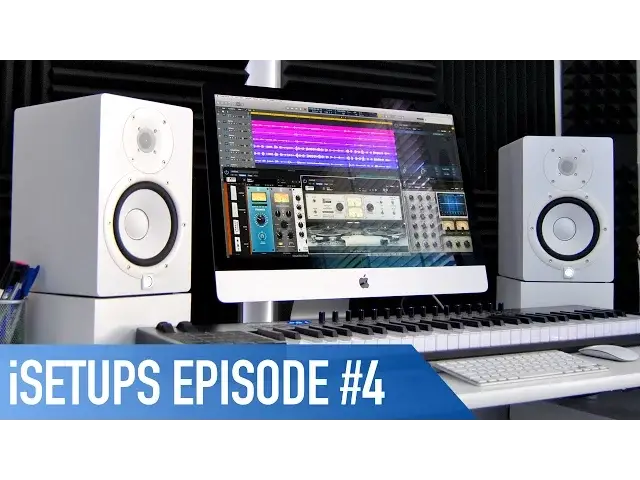
theme for his music-centric setup. Powering it all is his late 2013 27-inch iMac, which is his first Apple computer ever
0:42
He uses it for his music production, as he's a vocalist slash songwriter slash producer
0:46
based in Poland. Either side, there's the Yamaha HS7 speakers, as well as a Focusrite Scarlett 2i2 audio
0:52
interface which is mounted underneath the desk. On the screen, you might just be able to recognise Logic Pro X, which he uses to make
0:59
his sweet sweet music, along with his iPad Mini which he uses for logic control
1:04
I love the black soundproofing he's got on the walls, it's almost turned into decoration
1:08
or art thanks to the framing of the LED lights around it, and it really helps to break up
1:12
those white walls. Under the Mac, you'll see there's the Alesis VI61 MIDI keyboard, along with the 7th gen
1:18
iPod Nano. He's got a ton of other music gear which I haven't got time to go through, but I'll make
1:23
sure to leave a list in the breakdown in the description down below. The absolute kicker of the whole setup though, and brace yourselves for this, is his own
1:30
personal iMuseum, displaying all of the Apple devices he's used over the years
1:35
It's such a clever idea to display all of the previous Apple devices, and I'm definitely
1:38
going to be copying this for my home in some shape or form. It's such a great idea
1:43
At the bottom, there's a custom shelf which his brother's made from an old iPhone advertising stand
1:48
The only, and I mean only thing that lets this setup down, is that he's currently using a Samsung Trend as he's broken his iPhone, but he is planning to pick up an iPhone SE
1:56
in the near future. Okay, so it's not really a nitpicker at his setup, but I mean, what is there to say other
2:01
than wow? Next up is Gielmo Constanti. Again, I apologise if I messed up your name, but he's got a great clean setup, focusing
2:09
around white and black, with a slight splash of red. His main computer is the late 2016 MacBook Pro with Touch Bar, which has 8GB of RAM
2:16
and a 256GB SSD, which he uses for his photo editing, writing and generally browsing the web
2:23
It's hooked up to a 27-inch Dell 2713H Quad HD display, so we can see every little detail
2:28
when editing his photos. Either side are the Audio Engine A2 Plus speakers, along with an Honor Lily subwoofer underneath
2:35
His MacBook is sitting on what appears to be the Griffin Elevator Stand, where you'll
2:39
also find a 64GB LTE iPad Air with a product red case, as well as his iPhone 7, which also
2:44
has a product red case. He's using the Apple Magic Mouse 2, along with the Magic Keyboard 2, and they're both
2:50
sitting on a Perixx Gaming mouse mat. At the back, you can also see a GoPro Hero 5, let us know in the comments section what
2:55
you use this for Gielmo, as well as his AirPods, which are sitting on a black Apple Lightning Dock
3:00
I love the glossy table here, which reflects those lights behind the screen, and the minimalist
3:04
look of the whole setup. Simple, yet effective. Finally, we've got Madhu Rantachintala, who sent in his own video, so Madhu, take it away
3:13
So here we've got the Belkin Apple Watch charger, the BB8, and the Mophie wireless charger for
3:23
phones that can accept wireless charging. Here we have a Logitech Bluetooth keyboard with an iPad Pro that's 12.9 inches, 256GB
3:36
The cool thing behind it is a Logitech wireless charger that uses the smart connector to charge everything
3:46
We've got the Shark headphone stand, it comes with three USB Type-C ports, and a Verizon
3:54
Jetpack booster. That's my spare iPhone SE. This is the LG 27UD88
4:03
It supports USB Type-C charging, and it can flip into landscape and portrait mode
4:11
That is a 2015 MacBook Pro with Touch Bar. It's a 1TB computer
4:17
And then, last but not least, we have the Asus MX279H. So that is my desk, and I spend pretty much, you know, the majority of my day at this desk. Thanks
4:32
Great setup. So, he doesn't mention it in the video, but Madhu uses his setup for mostly work, creating
4:36
marketing flyers, and the occasional bit of video editing. Firstly, I love the LG 27UD88 display he's got there
4:43
I've done a full review of that which you can check out by clicking the card up top now
4:47
And I also love the kind of black and white theme he's got going on here
4:51
I think we could take the setup to the next level if we took away some of those wires behind the desk, maybe using some cable management like the Signum from Ikea, or just some 3M
4:59
tape to stick it to the back. Also, depending on what you use them for, I think it makes sense to place the two monitors
5:04
next to each other, like so, and have the MacBook to the left or the right, depending
5:09
on wherever you have more room. In my experience, this will make life a whole lot easier using both screens at once, and
5:14
it'll also be a lot easier for you to hide wires and such behind. Finally, add some colour-changing LEDs, such as the Hue, or my personal choice, the LIFX
5:22
LED strips, and the whole thing stands out a lot more. Great setup, Madhu, though, and thanks for sending it in the video
5:29
Well, that's it for episode 4 of iSetups, but let me know in the comments section which
5:33
of the three setups was your favourite. And if you'd like to submit yours, details on how to do so are found in the description
5:39
down below. New episodes are uploaded each and every Friday, so make sure to keep them coming
5:43
If you enjoyed the show, let me know by hitting the thumbs up, and don't forget to hit subscribe
5:48
so you don't miss any future episodes or any other videos from myself and Cult of Mac
5:52
I'll catch you in the next one. Bye
#Desktop Computers
#Laptops & Notebooks
#Consumer Electronics
#Audio Equipment
#Gadgets & Portable Electronics