0:00
Hey what's up guys Steve from Cult of Mac here and today I have got an exclusive look
0:04
at a new product which has just launched on Kickstarter which is the XVIDA mounting system
0:09
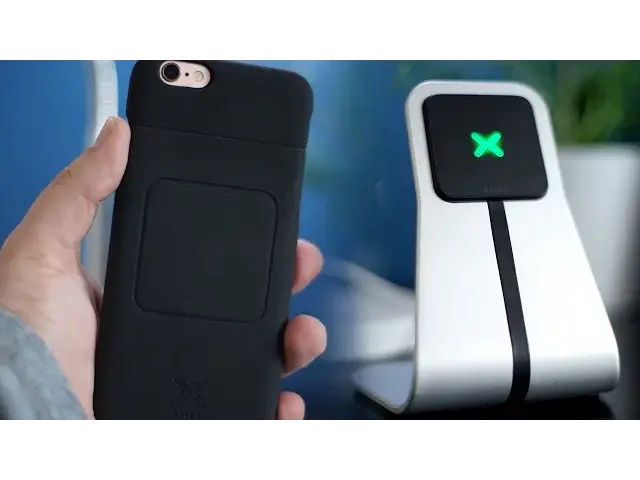
with Qi charging. So let's get started. This is the XVIDA Qi wireless charging desk stand. The desk stand along with several wireless
0:18
charging products complete a new range for XVIDA which has just launched on Kickstarter
0:22
Qi which is confusingly spelled Qi means it wirelessly charges your device, in this case
0:27
my iPhone 6s. Using inductive electrical power transfer comprising of a power transmission
0:32
pad which is this black square you can see here on the desk stand and a receiver that
0:36
can be found within the compatible iPhone 6s case provided. As they can't go into full
0:41
production until the Kickstarter campaign is funded, what I've got here is one of the
0:44
few prototypes they've made. So whilst this provides a great example of what the final
0:48
product will be like, I can confidently say that the production room will be a lot more refined, having owned a number of XVIDA products over the years, including their boomerang case
0:56
and desk stand for the iPad Air. The stand itself though is pretty darn perfect, but
1:01
the iPhone case provided is obviously 3D printed. Comparing this to a sticky case from XVIDA
1:06
you can see where the final product is going to be quality wise. Let's start by looking at the stand. It's constructed with high grade anodised aluminium
1:14
which looks and feels premium. In the centre you'll find the magnetic transmission pad
1:18
which attaches and secures to your iPhone. It's a super nice way to place your phone
1:21
on charge. Instead of a lot of the competitors offerings, or even the Android wireless solutions
1:26
placing your device on a circular disc, then adjusting your phone until you find the optimum
1:30
position. With the XVIDA's magnetic connection, the iPhone begins charging instantly, no problem
1:36
On the back of the stand there's a micro USB connection to connect to a power source
1:39
and on the front there's an LED indicator in the shape of the company's logo to let you know it's ready to go. Placing my iPhone on the stand is a joy, and it's the perfect
1:47
angle to view texts and emails whilst working away at my desk. If I'm forced to find a
1:51
problem here, it's only that the phone rocks when pressing the home button as there's
1:55
no support at the bottom of the phone. But I'm clutching at straws here
1:58
Let's move on to the case. It feels very similar to the sticky case which I'm currently
2:02
using for my iPhone SE, which is made with a plastic case with a rubber coating. Meaning
2:07
you get decent protection, but with a nice grip which is much more comfortable to hold
2:11
The edges of the case have a slight lip to protect your screen when placing it flat down on surfaces or in the event of a drop. Plus what's great is that it adds next to no bulk
2:19
which is one of my main concerns when using a case. In the rear of a case hides a magnet
2:23
this is what makes the case so easy to connect to the charger. Using the magnet means it
2:27
always connects to the right spot, getting that optimal connection. Charging my iPhone 6s from 0 to 100% took around 55 minutes, which compared to the standard
2:36
Apple charger takes my phone around 2 hours or so to complete. But why does it charge
2:40
so quickly I hear you ask? Well the Exvita cases uses what they call a next generation
2:46
chip, which charges almost 50% faster than most other Qi chargers. Along with the desk
2:50
stand, Exvita have also announced multiple car chargers and wall chargers which all work
2:54
with the case. So you can have these mounting systems placed around your home, work or car
2:59
to always keep your phone juiced up. So why invest in this system? Well the shorter charge time is enough to convince me to pick
3:05
one of these up. But adding to that the ease of charging my iPhone by simply placing it
3:09
on a stand, in my car or even on the wall takes one more hassle out of my life. No more
3:14
finding wires, trying to neatly hide it somewhere and constantly breaking of the lightning cable
3:19
Overall, it's a great solution. Well that's it for this video but let me know in the comments down below if you'll be backing
3:26
the Exvita Smartphone mounting system on Kickstarter. I'll also leave a link in the description
3:30
down below if you want to check more out. Also if you enjoyed this video, go ahead and
3:35
hit that like button as it really does help me out. And if you haven't already, hit subscribe
3:39
so you don't miss a single video from Cult of Mac. I'll catch you in the next one