You can FaceTime with Android and Windows friends, too — you don’t need to leave them out of the loop. You need to jump through some extra hoops, naturally, but you can video chat with your whole family and friend group.
While there’s no FaceTime app for Android or Windows, if you have an iPhone, you can initiate a group call by creating a link. Others can join the call from their web browser. It will be end-to-end encrypted, just like regular FaceTime calls, for maximum privacy.
Here’s how it works.
How to FaceTime with Android and Windows users
Apple has a reputation for being a walled garden, but the company’s services offer more cross-platform support than you might expect. Apple developed Android and Windows apps for Apple Music and Apple TV. And there’s even a Chrome extension that lets you sync your iCloud Passwords.
While iMessage remains an exclusive feature, Rich Communication Services (aka RCS) messaging brings many of the niceties to green bubble texting as well. You can send higher-resolution photos and videos, voice memos, rename group chats and more.
And since 2021, you’ve been able to create cross-platform group FaceTime calls as well.
Table of Contents: FaceTime with Android and Windows users
- Create a link from the FaceTime app
- Join the FaceTime call from Android
- Join the FaceTime call from Windows
- More FaceTime and Messages features
Invite Android and Windows users to FaceTime calls
Screenshot: D. Griffin Jones/Cult of Mac
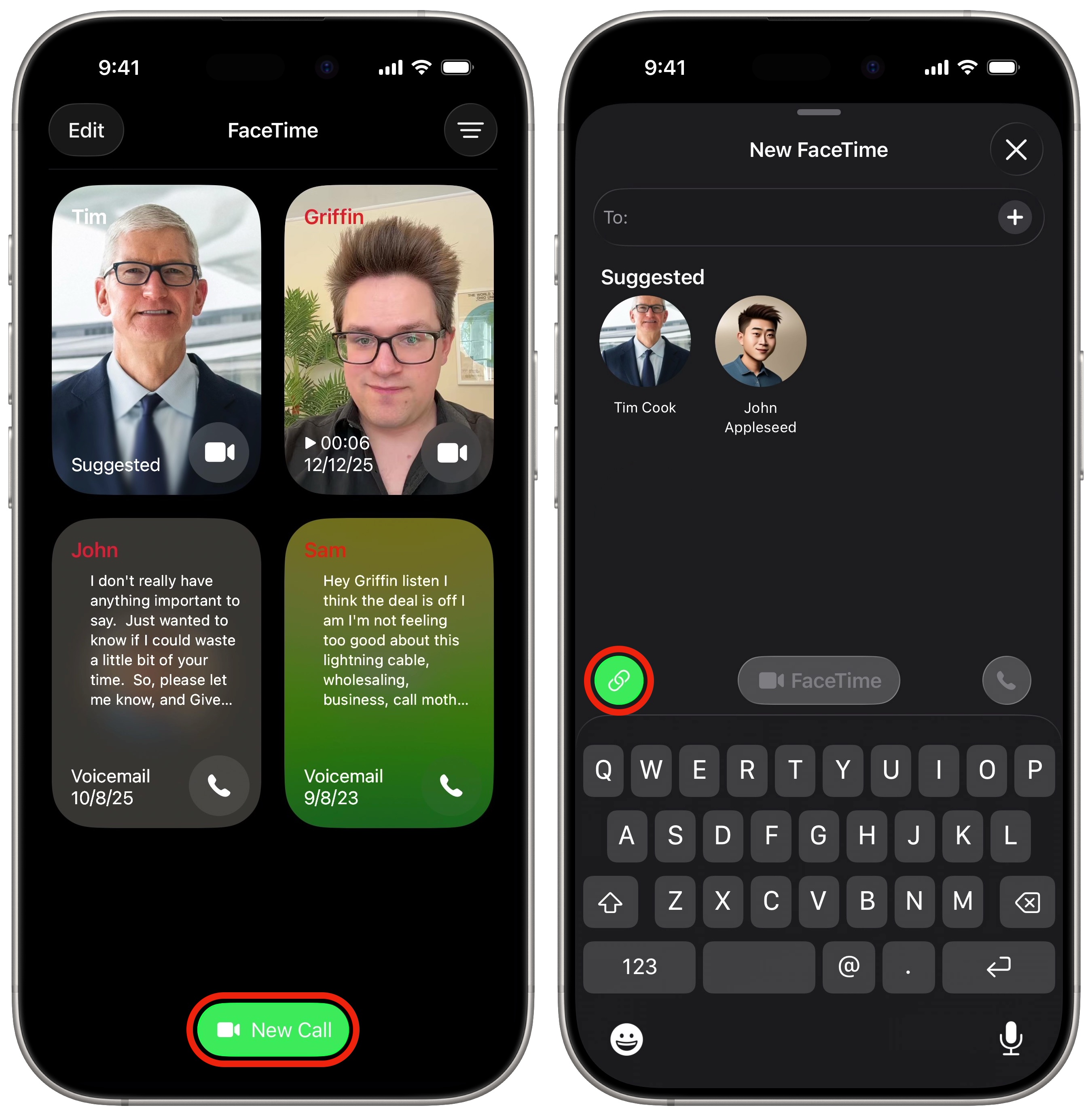
To send an invitation to FaceTime with Android or Windows users, open the FaceTime app. Tap the New Call button at the bottom, then tap the Create Link button to the left.
That’ll bring up the share menu, where you can choose how to send your invitation. You can text someone via Messages, AirDrop (some Android phones support AirDrop now) or even send an email. You can also tap Copy and paste the URL however you want.
Give your call a name by tapping Add Name at the top of the sheet.
Join the FaceTime call from Android or Windows
When the other person opens the FaceTime link, they don’t need to sign in to an Apple Account or anything. They just need to type in their name and tap Continue.
They’ll be asked by their browser to enable the camera and microphone, then they can ask you to join the call.
FaceTime on the web
Screenshot: Apple
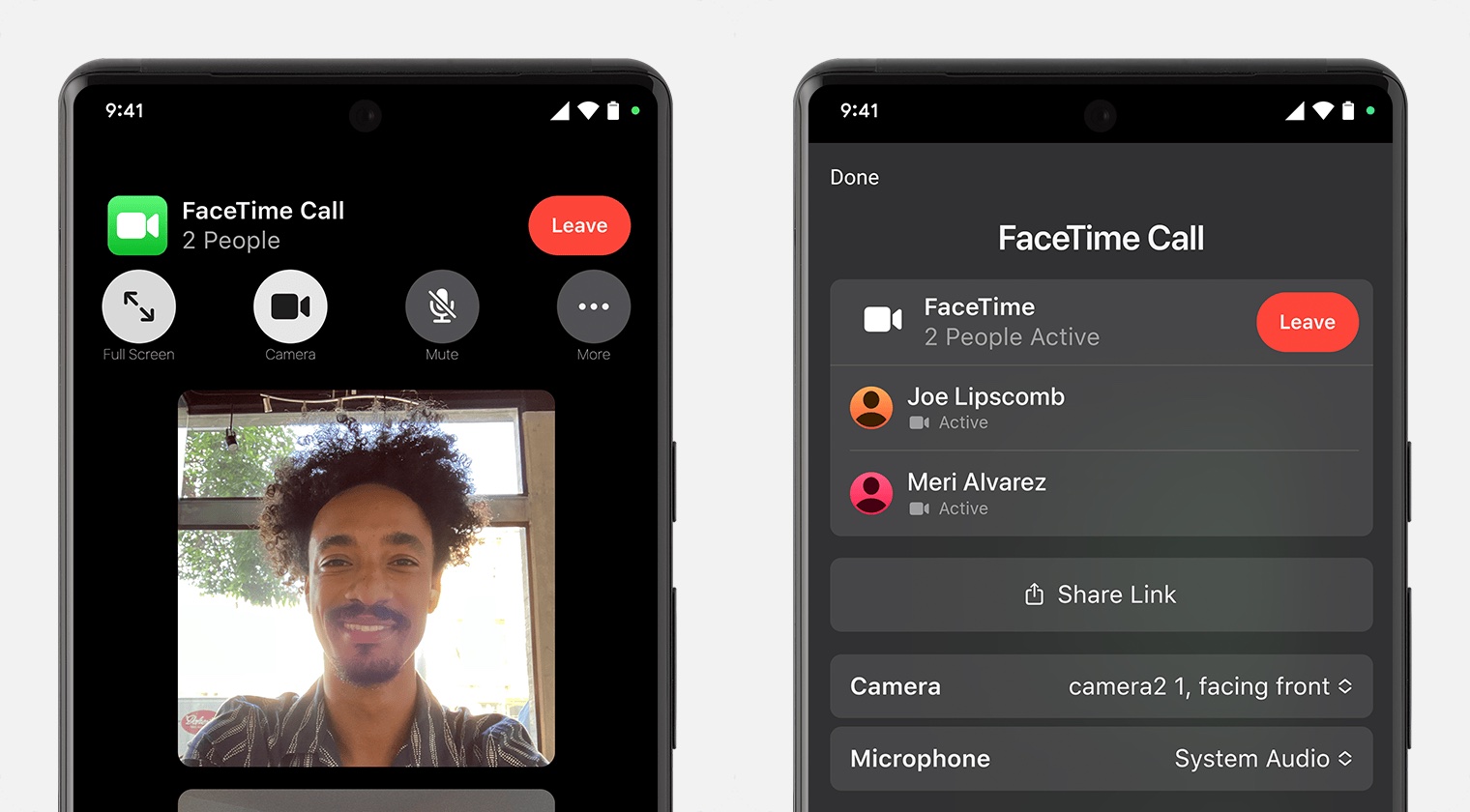
Many of the same FaceTime controls available on iPhone and iPad are also available to those on the web. Tap Camera to turn off your video or Mute to go silent. Tap Flip Camera to use your rear camera instead.
There are a few options to change up the layout of people onscreen, too. Tap Full Screen to see a larger preview of your own video. Tap More (the ⋯ button) and tap Grid Layout to see everyone in an equally-sized grid view.
FaceTime links can also be used to invite Linux, Chrome OS and other modern devices to join FaceTime calls. You can also send FaceTime links with other iPhone, iPad and Mac users — they’re a great way to schedule calls for later. The links will open in the FaceTime app, not in a web browser.
More FaceTime and Messages features
Now that you know how to make FaceTime calls with Android and Windows users, take a moment to learn more about Apple’s messaging services.
- Leave a FaceTime voicemail to make a quick video recording if someone doesn’t pick up your call.
- RCS messaging makes features like read receipts, video and file attachments and named group chats — previously exclusive to iMessage (and some apps) — possible between iPhone and Android.
- Edit or unsend messages, soon after sending them, if you make a mistake.
- Schedule texts to send later on iPhone to make sure you never forget to send a reminder, birthday greeting or early morning message for someone in a different time zone. You can schedule a whole slew of texts up to a week in advance, with links, photos, attachments and more.
- iMessage effects can add much more meaning, emotion and fun to your texting. You can add bold, italics, underline and
strikethroughtext, just like a formatted document, and even choose from a bunch of cool, animated effects. - Check In is an iPhone feature that tracks your travels and lets contacts know when you’ve safely reached your destination.
Killian Bell contributed to this article. We originally published this article on how to FaceTime with Android and Windows devices on January 21, 2022. We updated it with the latest information on April 21, 2026.

Killian Bell is a freelance writer based in the U.K. He has an interest in all things tech and also covers Android over at CultofAndroid.com. You can follow him on Twitter via @killianbell.

