
There are a few useful things you can do with an old Apple Watch after you upgrade to a new one. You might think of the Apple Watch as being a disposable product — because who would wear two watches? But there are actually quite a few surprising use cases for having a daily Apple Watch and a secondary watch.
Things you can do with an old Apple Watch
Upgrading your Apple Watch doesn’t have to mean consigning the old one to a junk drawer. In fact, that older wearable could turn out to be incredibly useful once it’s no longer your everyday companion.
The Apple Watch is a surprisingly capable little computer, and keeping a second one around opens up some clever possibilities. You might use it as a dedicated sleep tracker, a beater for risky adventures, or even a stripped-down phone for leaving your iPhone behind. In a world where tech companies constantly encourage us to trade up, sometimes finding a second life for a gadget you already own can mean a real lifestyle upgrade.
Table of contents: Things you can do with an old Apple Watch
- Dedicated night watch for sleep tracking
- Risky activity tracking
- Wearing a watch on your arm or leg
- Hand it down to a child or friend
- Run a beta version of watchOS
- Turn your old Apple Watch into a small phone
1. Dedicated night watch for sleep tracking
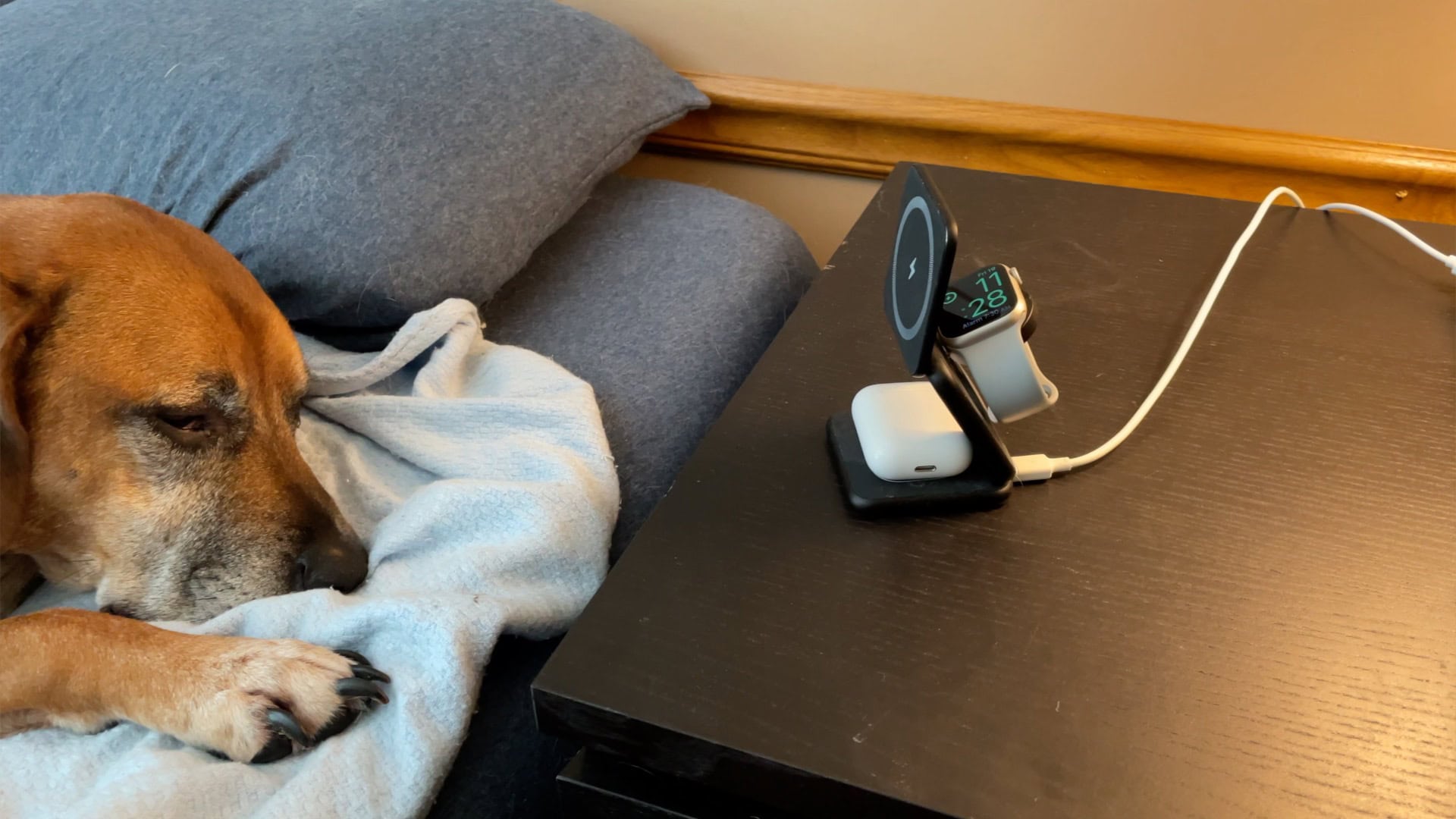
Photo: D. Griffin Jones/Cult of Mac
The Apple Watch is great for tracking sleep — even the different stages of your sleep through the night. And if you use your Apple Watch as an alarm, it’ll wake you up by silently buzzing on your wrist, so your partner won’t be awoken by your alarm if they wake up a little later.
However, if you wear your watch during the day and you wear it to bed, when do you charge it? Personally, I hate the idea of charging my watch during the day because if I get up and move around while it’s juicing up, I won’t get credit for my Move or Stand rings.
This points to a prime way to put an old Apple Watch to good use: Turn it into a dedicated sleep tracker and alarm. You keep your old one on the charger during the day and wear your new one out and about. Then, you swap them when it’s time for bed and after you wake up. You never need to worry about topping up the battery in the evening before you go to sleep or in the morning rush.
Another benefit? If your daily watch band focuses on fashion rather than comfort, like a Milanese Loop, you don’t need to switch it out with a Sport Band every morning and every night. You can pick the best type of band for each Apple Watch.
2. Risky activity tracking

Photo: Apple
The Apple Watch is surprisingly hardy and water-resistant, but sometimes an unusual excursion might make you a bit nervous about wearing it. Instead of risking your expensive new Apple Watch when you go rock climbing, skydiving or swimming in the ocean, you can strap on your old watch instead. After all, a hand-me-down Apple Watch is much cheaper than buying a new Apple Watch Ultra.
Some people choose to protect their watch in a case, like this option from elago. Personally, I find these a little unsightly, and they can be a pain to put on and take off. But you can keep your secondary Apple Watch permanently encased, so you don’t need to fiddle with it every day.
3. Wearing an old Apple Watch on your arm or leg
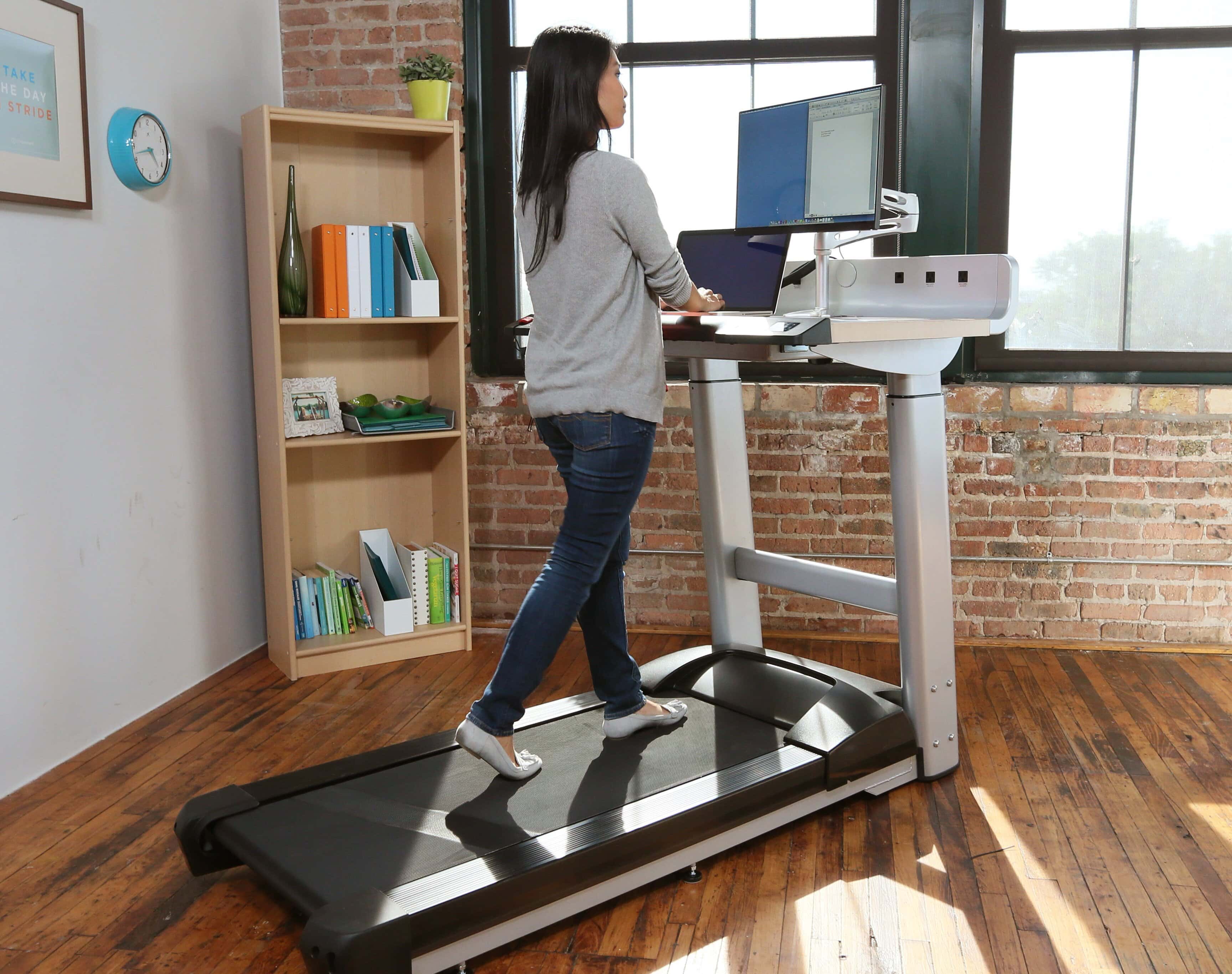
Photo: InMovement
Although it’s designed for it, you don’t actually have to wear your Apple Watch on your wrist. In fact, for some workouts, wearing your Apple Watch higher up on your arm or around your ankle might work better.
For instance, if you play sports where precision is key, like tennis or basketball, the weight on your wrist might affect how you train and play. The TwelveSouth ActionSleeve keeps your watch on your arm, where you can still use it for tracking your activity, but gets it out of the way. If you use your secondary Apple Watch for this, then you don’t have to worry about swapping out your regular band for a complicated accessory and case before and after every session.
On the other hand, you might want to wear an Apple Watch on your ankle. If you work at a treadmill desk, for example, you won’t get any credit for all that walking, because your arms will be just as stationary as if you were at a regular desk. Wearing a second Apple Watch around your ankle, you can still work towards your Move, Stand and Exercise rings — and you’ll still have your main watch on your wrist for notifications and telling time.
4. Hand down your old Apple Watch to a child or friend

Image: Apple
If your kid is old enough to spend the night at a friend’s house but too young for an iPhone, you can give them an Apple Watch instead. You’ll be able to track their location using GPS and Find My. Plus, it gives them an easy way to send texts. And if it’s a cellular Apple Watch model, you can call them wherever they may be. Setting up an Apple Watch on behalf of your child is really easy — after wiping it and setting it up from scratch, just tap Set Up for a Family Member.
Because it’s only a watch and not a smartphone, you can rest assured they won’t get sucked into TikTok or Roblox or Wikipedia or whatever it is that parents are afraid of kids doing.
Alternatively, you can hand off your old Apple Watch to a friend who doesn’t have one.
5. Run a beta version of watchOS
Screenshot: D. Griffin Jones/Cult of Mac
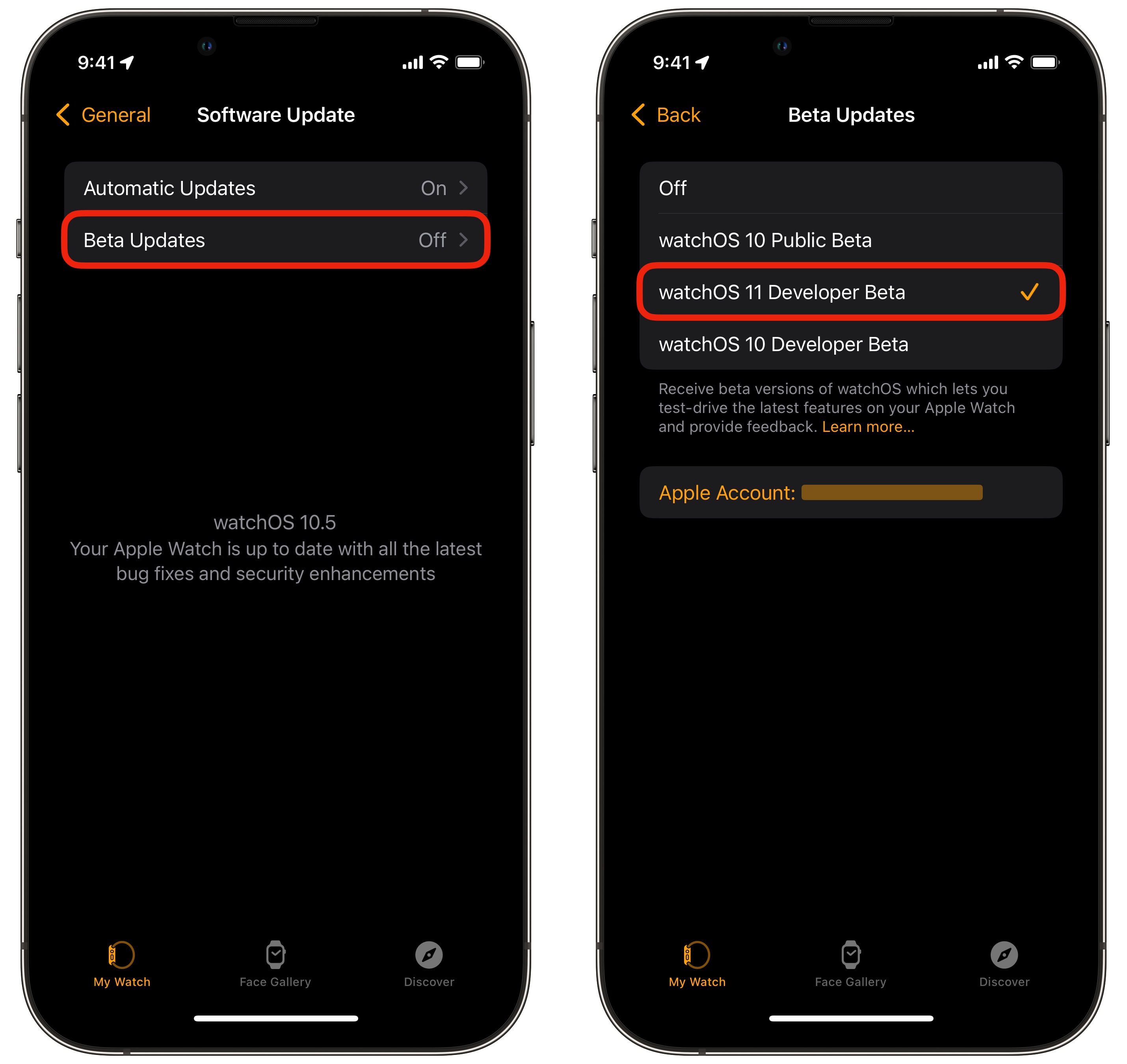
If you want to check out the new features of what’s coming next in watchOS, you can install a watchOS beta. Unfortunately, running a watchOS beta is kind of a pain in the ass. For one, you must install the associated iOS beta on your iPhone in order to install the watchOS beta, and you might not want to put your most important device at risk.
Plus, unlike on the iPhone, you can’t undo a watchOS update. Once you’re on a watchOS beta, you can’t go back to an older version. And most of all, once you switch to the beta track, you get new software updates every two to three weeks — and installing updates on the Apple Watch is, notoriously, incredibly irritating.
If you really want to try out the new features early but you don’t want to put your primary watch on the line, you can install the watchOS beta on a second watch, provided it’s new enough. This year, the watchOS 27 betas require an Apple Watch Series 9 or newer, an Apple Watch Ultra 2 or newer, or a third-generation Apple Watch SE 3.
6. Turn your old Apple Watch into a small phone
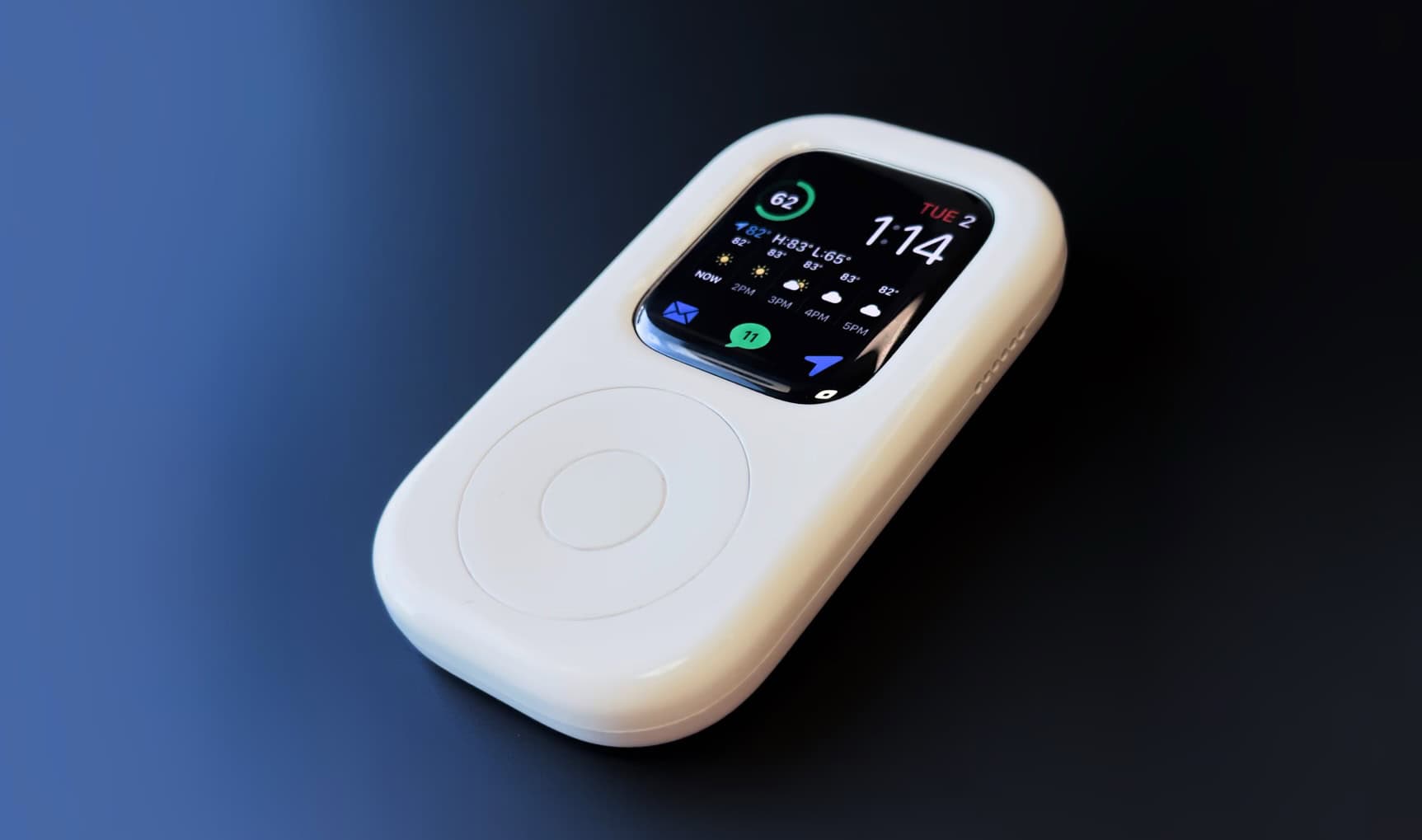
Photo: TinyPod
It’s easy to overlook how the Apple Watch is actually a pretty powerful and capable computer — and cellphone — all by itself. With products like Techpod’s RePod C1 and the TinyPod, your Apple Watch slides into an iPod-shaped case that turns it into a tiny standalone cellphone or music player. They even come with click-wheel-style controls that spin the Apple Watch’s Digital Crown for scrolling like it’s 2004.
A bunch of companies have tried and failed to reinvent the minimal cellphone, but the problem with abandoning your iPhone is that you get a new phone number that isn’t compatible with iMessage. If you use an old cellular Apple Watch instead, you can retain compatibility with your Apple Account. Switching is as simple as keeping your iPhone on your nightstand and putting your RePod C1 or TinyPod in your pocket instead.
Or, get a little trade-in money when you buy a new one
Personally, when I upgraded from my Apple Watch Series 3 model to my … (wait, which one do I have?) Series 7, my old watch felt so slow and broken that I simply traded it in. It was too old to be useful for basically anything else. If you want a bit of a discount when you buy a watch, you can use our trade-in program.
More Apple Watch how-tos and articles
- How to customize Apple Watch widgets for easy access to your favorite apps
- How to silence your Apple Watch, use Do Not Disturb and theater mode
- Get the time without even looking at your Apple Watch
- These are the best and coolest Apple Watch faces
We originally published this article on what to do with an old Apple Watch on July 20, 2024. We updated the information.

D. Griffin Jones was a writer, podcaster and video producer for Cult of Mac. Griffin has been a passionate computer enthusiast since 2002, when he got his first PC — but since getting a Mac in 2008, he hasn’t turned back. His skills in graphic and web design, along with video and podcast editing, are self-taught over 20+ years. Griffin has a bachelor’s degree in computer science and has written several (unpublished) apps for Mac and iOS. His collection of old computers is made up of 40+ desktops, laptops, PDAs and devices, dating back to the early ’80s.
Griffin writes for his personal blog, Extra Ordinary, and is currently looking for work.

One response to “6 cool things you can do with an old Apple Watch”
Since you’re weighing a spare watch, the main things to compare are the generation and the app costs. GadgetVitals lists the Apple Watch models it tracks and what the apps cost, at https://gadgetvitals.com/brands/apple.