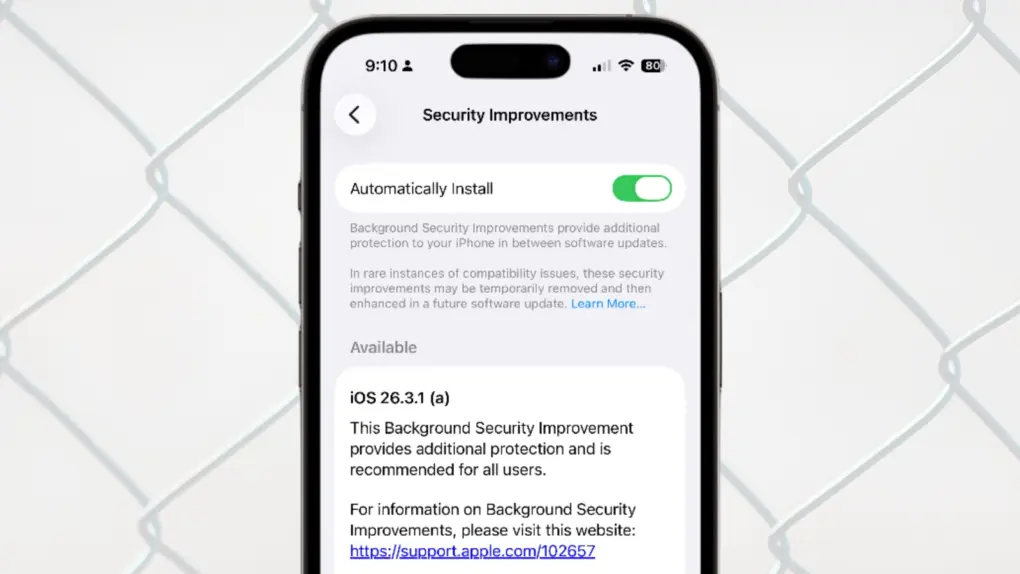
Apple updated iOS, macOS and iPadOS with a Background Security Improvements patch on Tuesday, the first time the company has used its new system for securing user devices. This patch fixes a flaw in WebKit that could have allowed malicious websites to access data from other websites.
Background Security Improvements are installed without requiring the iPhone, Mac or iPad user to do anything — or even be aware of the update.
Background Security Improvements make patching iPhone and Mac easy
Installing security patches onto Apple devices used to require a full operating system update, which some users are reluctant to do and others simply procrastinate about. That’s why Apple created Background Security Improvements.
These are installed without user intervention and therefore accelerate the delivery of security updates. Users don’t have to opt in to get the security patches — they are enabled by default and get installed in the background.
The apparent goal is to make security a persistent layer of defense rather than something that depends on user action.
About iOS 26.3.1 (a), iPadOS 26.3.1 (a), macOS 26.3.1 (a), macOS 26.3.2 (a)
Apple’s brief description of the first Background Security Improvements patch says it fixes a flaw in WebKit in which “processing maliciously crafted web content may bypass Same Origin Policy.”
Adam Boynton, senior enterprise strategy manager at Jamf, explained the security risk.
“WebKit is the underlying technology that powers Safari and other browsers on iOS,” he said in an email. “The flaw, CVE-2026-20643, specifically affects the Same Origin Policy, which stops one website from accessing another’s personal information. By exploiting the vulnerability, maliciously crafted web content could potentially access data from another site.”
The name for the patch indicates this is a tweak to current operating system versions. It just appends an “(a)” to the OS version number. For example: iOS 26.3.1 (a), iPadOS 26.3.1 (a), macOS 26.3.1 (a) and macOS 26.3.2 (a).
Although Apple introduced the patch Tuesday, it’s apparently still rolling out. A check of computers at Cult of Mac on Wednesday did not turn up any onto which the update has been automatically installed. Instead, it’s listed as available in Settings > Privacy & Security > Background Security Improvements.
Not a regular iOS or macOS update
Do not look for the patch in Settings > General > Software Update. Background Security Improvements are not treated like traditional iOS or macOS updates. This means that even devices with automatic operating system updates toggled off will still receive the security patches.
Anyone who wants to block them needs to do so under Settings > Privacy & Security > Background Security Improvements.

Ed Hardy has been writing full-time about tech for 25 years, and using it for much longer than that. His intro to Apple was a Macintosh SE/30 (which he still has), but now he uses a 13-inch iPad Pro as his primary computer.
That’s because he’s a “tablet first” type of guy. Rather than use a Macbook, he connects a keyboard case to the iPad. And instead of a desktop Mac, he connects his tablet to a 27-inch display and full-size keyboard. (So don’t try to tell him that everyone has to use a Mac to be productive.)
Before coming to Cult of Mac, Ed wrote for NotebookReview, TabletPCReview and Brighthand, as well as other sites.

