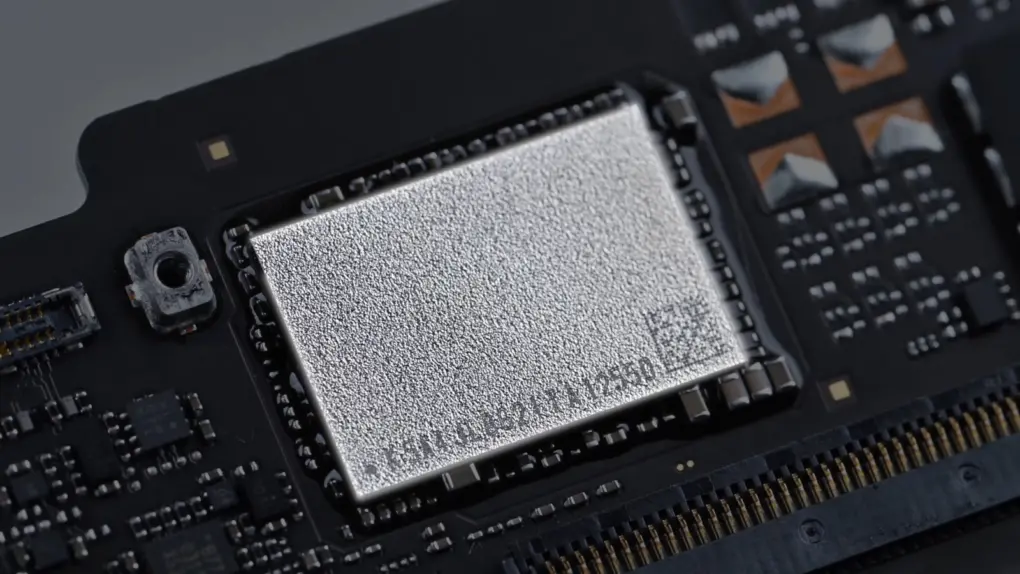
A MacBook Neo can be upgraded to 1TB of storage, but the DIY project isn’t for amateurs. A video demonstrating the process shows that it takes skills, experience and the right equipment.
Still, it’s interesting to watch. Especially as it also shows how easy it is to disassemble the MacBook Neo.
A repairable MacBook?!?
The maximum storage a MacBook Neo can be configured with is a 512GB SSD. That’s a reasonable amount, considering the $699 price for that variant.
But some people always want more. And DirectorFeng used his YouTube channel to show how he disassembled a Neo, removed the SSD, then put a 1TB drive in its place.
The first phase of the upgrade is actually within the capabilities of anyone with the right tools and some patience. That’s because the MacBook Neo is relatively easy to work on. iFixit called it “the most repairable MacBook in 14 years.”
That means a user can remove the battery from the notebook without too much hassle. But someone can’t replace the SSD armed with just a few tools and a can-do attitude.
Replacing the SSD in a MacBook Neo
This isn’t a “swap an SSD” upgrade — it’s essentially surgery. Upgrading the storage in a MacBook Neo to 1TB requires replacing a NAND chip that’s soldered onto the motherboard.
The project requires:
- hot-air rework tools
- microscopes
- reballing/reflow skills
The project involves partially disassembling the notebook, desoldering its built-in NAND storage, soldering on a higher-capacity chip, reflashing macOS, and then reassembling the system.
If it’s not obvious, this is a delicate, professional-level repair that pushes the limits of modern laptop upgrades.
Want to watch an expert do the job? Take a look at DirectorFeng on YouTube:
Don’t expect a similar MacBook Neo RAM upgrade
While the storage options available to MacBook Neo buyers have drawn a bit of criticism, the laptop’s 8GB of RAM has generated much more skepticism. The complaints aren’t coming from likely buyers of the computer, though, but from people who think they’re experts. And that’s despite many reviews that point out that the Neo performs very well for a laptop in its price range.
Still, if there’s anyone hoping that a storage upgrade — even a difficult one — proves that a MacBook Neo RAM upgrade is also possible … it’s not.
Upgrading storage on a MacBook Neo is already extreme, but attempting the same kind of modification with RAM — or more accurately, Apple’s unified memory — crosses into a completely different level of difficulty.
How Apple’s unified memory works
First, Apple doesn’t solder the memory onto the logic board like a replaceable chip. Apple silicon-powered computers integrate unified memory directly alongside the system-on-a-chip in a tightly coupled package.
That means the RAM chips sit on the same substrate as the processor, connected through ultra-short, high-bandwidth pathways connected at the factory. There’s no separate “RAM module” to swap — you’re dealing with components that are effectively part of the CPU itself.
Second, even if you could physically remove and replace those memory chips, the system wouldn’t recognize the upgrade. Apple configures memory capacity at a firmware and hardware level, tied into the chip’s memory controller and the low-level system configuration.
Unlike storage, which can be reformatted and reinitialized, unified memory requires the system to know exactly how much is present from the moment it powers on. Changing that would likely require undocumented firmware modifications that aren’t publicly available.
Finally, the tolerances involved are even tighter than NAND replacement. These LPDDR memory chips are densely packed, often stacked, and extremely sensitive to heat and alignment. The risk of damaging the SoC or breaking critical connections runs far higher than with storage, where the NAND sits elsewhere on the board and can, in rare cases, be swapped by specialists.
In short, while a 1TB storage upgrade is a risky but achievable feat for an expert technician, upgrading unified memory is closer to reengineering the processor itself — making it effectively impossible.

Ed Hardy has been writing full-time about tech for 25 years, and using it for much longer than that. His intro to Apple was a Macintosh SE/30 (which he still has), but now he uses a 13-inch iPad Pro as his primary computer.
That’s because he’s a “tablet first” type of guy. Rather than use a Macbook, he connects a keyboard case to the iPad. And instead of a desktop Mac, he connects his tablet to a 27-inch display and full-size keyboard. (So don’t try to tell him that everyone has to use a Mac to be productive.)
Before coming to Cult of Mac, Ed wrote for NotebookReview, TabletPCReview and Brighthand, as well as other sites.

