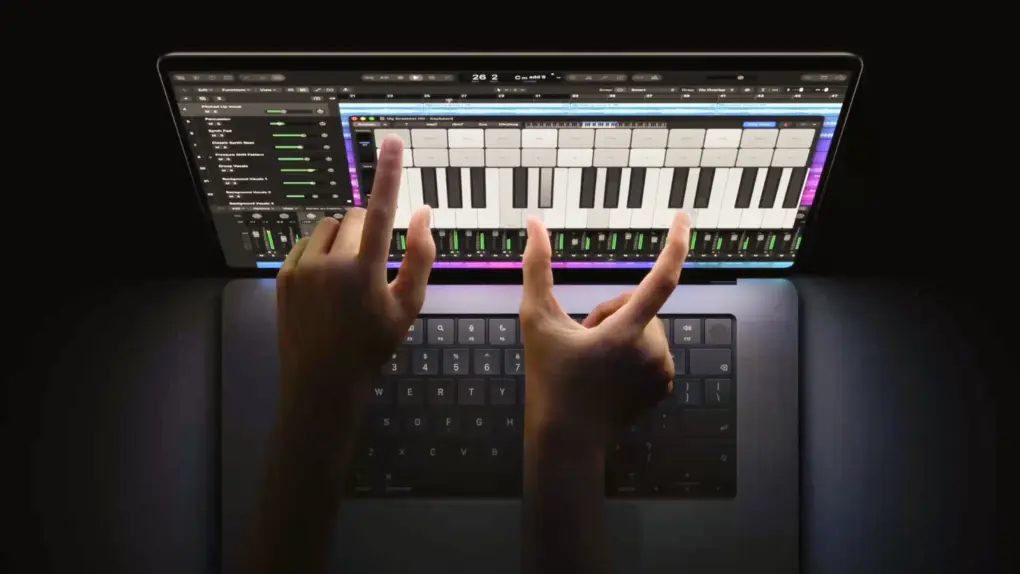
The MacBook Pro with PROLED XDR Display just announced by Apple will be remembered for many years… for good or ill. Users will undoubtedly love the beautiful OLED display and the lighter weight, but only time will tell whether its touchscreen will catch on — there’s a great deal of pre-launch resistance to a touch-enabled Mac.
The device is thinner and lighter, and includes a Dynamic Island in place of the screen notch and even a glowing Apple logo. But the eye-watering price is also likely to draw criticism.
Apple is very upbeat about the device, of course.
“The new MacBook Pro with PROLED XDR Display is a monumental step forward for the Mac,” said Johny Srouji, Apple’s chief hardware officer, in a statement. “PROLED XDR is the world’s best laptop display. It pairs state-of-the-art tandem OLED technology with advanced algorithms in our display engine to deliver the kind of visual fidelity pros have been dreaming of. And with the magic of Touch coming to MacBook Pro, combined with the game-changing performance of M5 Pro and M5 Max, we’ve created a whole new way for pros to interact with their content, taking their workflows to a completely new level. The new MacBook Pro is the result of the deep integration between Apple silicon, hardware, and software, and there’s simply nothing else like it.”
A touchscreen MacBook Pro at last
In 2010, Apple co-founder Steve Jobs gave his opinion on putting a touchscreen in a Mac. It wasn’t positive: “We’ve done tons of user testing on this, and it turns out it doesn’t work. Touch surfaces don’t want to be vertical. It gives great demo, but after a short period of time, you start to fatigue and after an extended period of time, your arm wants to fall off. It doesn’t work, it’s ergonomically terrible.”
And yet many years later, Apple just launched a MacBook with a touchscreen. The reason may be of Apple’s own doing. In the years since Jobs criticized the idea, we’ve all become very accustomed to controlling our iPhones and iPads with touch. Our Macs were one of the few screens we couldn’t control with a fingertip… but not anymore.
“Everyday tasks are simple and intuitive, allowing users to scroll through a webpage with a natural swipe; pinch to zoom in on a photo; drag and drop slides from one presentation to another; and double-tap a window to fill the screen, or flick to tile it into place,” said Apple about the modified version of macOS Golden Gate in its new laptop.
It’s important to note that touch is not the primary method of interacting with the latest MacBook Pro. It is certainly not a convergence of a laptop and an iPad. Instead, while the user has the option to touch the screen, they’ll mostly use the traditional keyboard and trackpad.
Making touch control a secondary option may dim down some of the potential resistance toward putting a touchscreen in the MacBook Pro.
Touch support does not imply support for Apple Pencil. No version of the stylus works with the MacBook Pro with PROLED XDR Display.
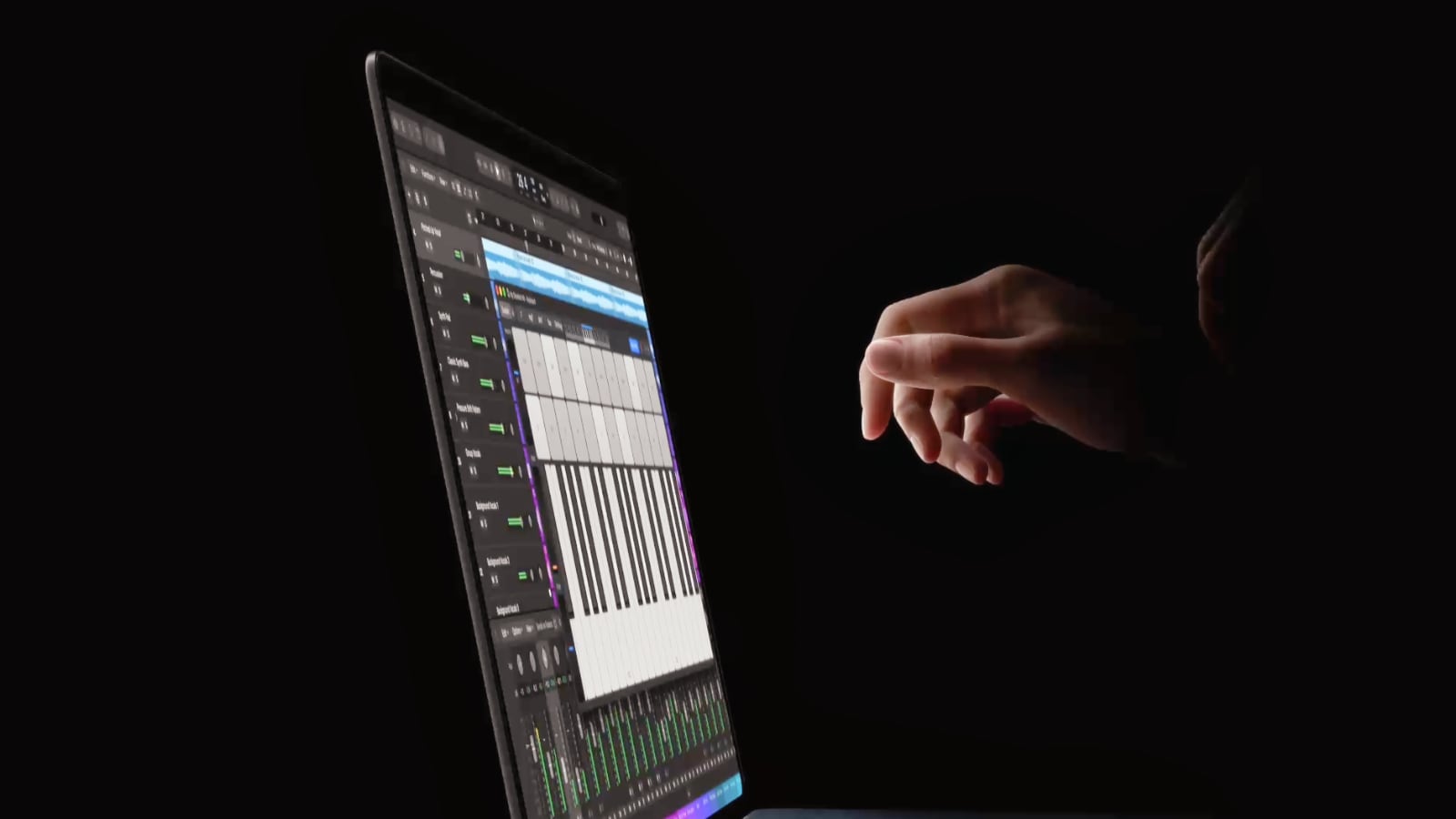
Photo: Apple
A gorgeous tandem OLED display: Hurray!
What won’t be controversial about Apple’s latest macOS laptop is the tandem OLED display in both the 14-inch and 16-inch variants of the latest MacBook Pro.
Organic light-emitting diode screens deliver several advantages over the LCD technology used in previous models. Because each OLED pixel produces its own light, the screen can turn individual pixels completely off to create true blacks, resulting in dramatically higher contrast — Apple promises an industry-leading 10,000,000:1 contrast ratio.
Tandem OLED also produces vibrant colors, offers excellent viewing angles and responds quickly to changes on screen, making it well suited to video editing, HDR content and gaming.
The PROLED XDR display in the latest MacBook Pro offers up to 2000 nits peak HDR and SDR brightness. ProMotion support means the refresh rate can go from as low as 10Hz for better power efficiency or up to 120Hz for showing content in motion.
Without the need for backlights, the technology also enables a thinner, lighter display assembly, giving Apple more flexibility in designing the notebook.
Dynamic Island comes to Mac
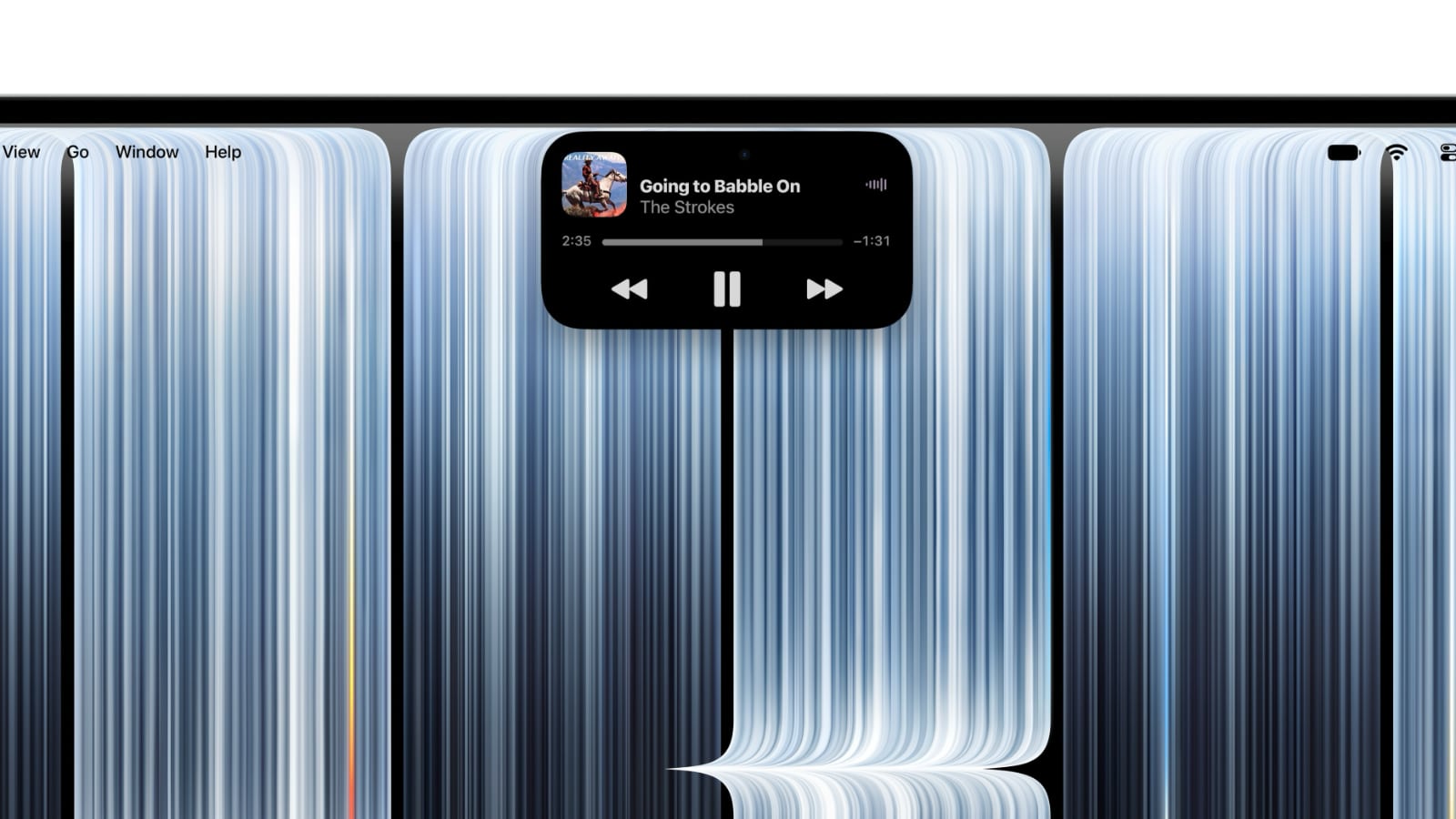
Photo: Apple
Set in the PROLED XDR display of the MacBook Pro is the familiar Dynamic Island, making the jump over from the iPhone. It replaces the more traditional screen notch from previous macOS laptops.
“Just like on iPhone, the Dynamic Island provides a quick, intuitive way to see and interact with important information,” said Apple.
As on iOS devices, the cutout shrinks or expands to display notifications, Live Activities and more.
The glowing Apple logo is back!
For years, many MacBook fans have hoped Apple would bring back the glowing logo that once made its laptops instantly recognizable. It was a feature of the company’s laptops from 1999 to 2015, but disappeared for over a decade.
Now the glowing logo is back in the latest MacBook Pro. It’s important enough that Apple CEO John Ternus made a post about it on X:
We’re glowing with excitement over the new MacBook Pro. You’ve gotta touch it to believe it. pic.twitter.com/BLiGkGaefL
— John Ternus (@johnternus) October 28, 2026
Much lighter: Another positive change
Apple redesigned the MacBook Pro for the first time since 2021, and managed to cut the weight considerably.
The 14-inch version weighs 3.0 pounds — half a pound less than its predecessor. The 16-inch MacBook Pro weighs 4.0 pounds — 0.7 pounds lighter than before.
The new laptops are also slightly thinner, but the differences are unlikely to be noticeable: just a millimeter at most.
Given that Apple only redesigns its notebooks about twice a decade, anyone on the market for a MacBook in the next five or six years should celebrate the decrease in weight.
M5 Pro or M5 Max processors, and no M6 in sight
Several Macs launched this autumn with the base version of the M6 processor, and one might expect Apple’s new premiere laptop to feature advanced versions of this processor. That’s not what happened: the MacBook Pro with PROLED XDR Display can be configured with either an M5 Pro or M5 Max processor, the same chips in the non-touchscreen version introduced back in March.
According to unconfirmed reports, Apple didn’t put the M6 Pro and M6 Max into its latest notebook because it decided to fasttrack the M7 family. Supposedly, the basic version of the M6 is the only one there’ll ever be.
The base model of the new MacBook Pro with M5 Pro comes with 24GB of Unified Memory and 1TB of storage. The base model M5 Max version comes with 32GB of Unified Memory and 2TB of storage. The computer is configurable with up to 128GB of RAM and 4TB of capacity, though the highest configurations require the M5 Max.
So much connectivity
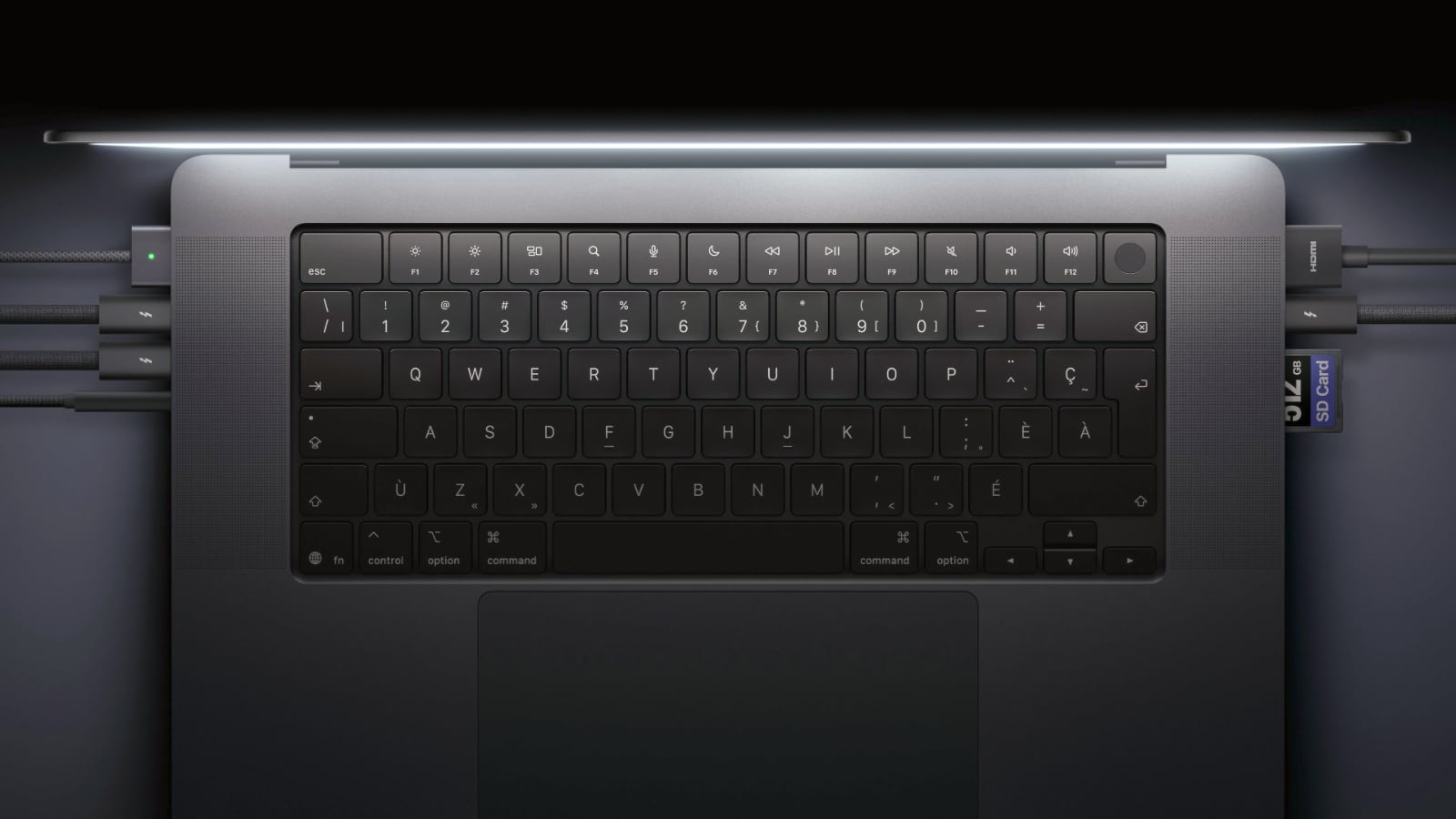
Photo: Apple
The new MacBook Pro is not short of connectivity options. Most notably, reducing the weight of the laptop did not require cutting any ports. It offers three Thunderbolt 5 ports, an HDMI port, an SDXC card slot, MagSafe charging and a headphone jack.
Need an external screen or two? More? It supports up to three external displays with M5 Pro and up to four with M5 Max.
As for other ways of keeping connected, Wi-Fi 7 and Bluetooth 6 provide fast wireless connectivity, while Touch ID makes logging in quick, convenient and secure.
Quite a jump in price
With the ongoing RAMageddon global memory crisis pushing up the cost of RAM and storage, a price hike for this MacBook Pro was inevitable. Plus, OLED panels cost more to produce, and adding a touchscreen also adds to the assembly cost.
The result is that the 14-inch version starts at $2,899 (U.S.). The 16-inch variant of the new MacBook Pro starts at $3,399 (U.S.). That’s a whopping $700 above the original price tags of the previous versions’ base models.
And, of course, configuring the laptop with a faster chip plus more RAM and/or storage increases the cost. The base model uses the M5 Pro. The minimal cost for the 14-inch variant with an M5 Max is $4,499. Put the M5 Max in the 16-inch variant and the cost is at least $4,799.
Go all out — 16-inch nano-texture screen, the fastest version of the M5 Max, 128 GB of Unified Memory and 4TB of storage — and the computer costs $7,549.
Pre-orders for the new MacBook Pro with PROLED XDR Display start Wednesday, October 28, in 30 countries and regions, including the U.S. It will begin reaching customers and store shelves on Friday, November 6.
Preorder now: Apple

Ed Hardy has been writing full-time about tech for 26 years, and using it for much longer than that. His intro to Apple was a Macintosh SE/30 (which he still has), but now he uses a 13-inch iPad Pro as his primary computer.
That’s because he’s a “tablet first” type of guy. Rather than use a Macbook, he connects a keyboard case to the iPad. And instead of a desktop Mac, he connects his tablet to a 27-inch display and full-size keyboard. (So don’t try to tell him that everyone has to use a Mac to be productive.)
Before coming to Cult of Mac, Ed wrote for NotebookReview, TabletPCReview and Brighthand, as well as other sites.


3 responses to “OLED MacBook Pro reignites controversy over touchscreen laptops”
Uhm.. what controversy over touchscreens? They’ve been standard on Windows laptops and tablets since 2013. On laptops, they’re entirely optional to use. Don’t like it, use the trackpad or connect a mouse. Normally I’d say “it’s only an issue if it makes the device a lot more expensive…” but come on – this is an Apple product. One just assumes any new feature means it’ll be much more expensive.
Personally, I’m waiting for the inevitable “Apple invented this/Apple made it perfect” rhetoric from the Apple Faithful. Also, bet this won’t support Apple Pencil even though most Windows touchscreen support a digital stylus. Can’t be TOO much like the regular people, right?
Though I would think it will support Apple Pencil soon enough
I have never understood the people who object to putting touch on the Mac. Surely they realized that this wouldn’t mean they don’t get a mouse or a trackpad? And all I had to do was look in an iPad to know that small targets would expand the first time you hit them. And how did they not realize that sometimes jabbing something with your finger is much much quicker than reaching for your mouse, moving the pointer to where you want and clicking?
I’ve ordered one of these. I’m trading in my almost brand new 14 inch MacBook Pro and my almost as new 13 inch iPad Pro. Aside from making future updates easier, this will also cut down my AppleCare one costs. Yes, there will be some small adjustment, but as I use Apple apps almost exclusively, I expect their adjustment to be minor.