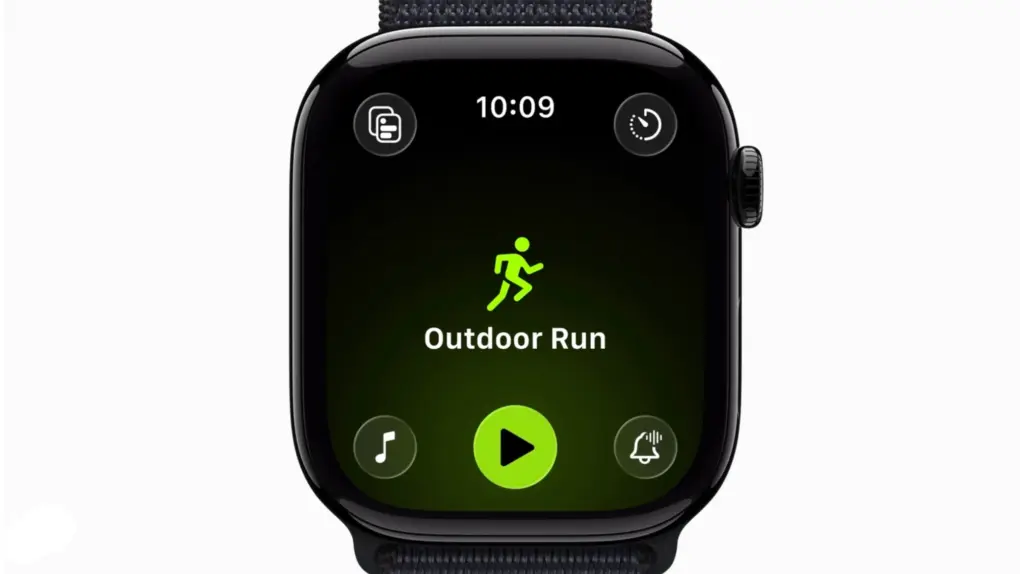
When it released watchOS 26.4 on Tuesday, Apple fixed an annoying recent addition to the Workout app. After you update, you can tap on the big fat workout type icon to start recording a workout quickly and easily.
It’s a small thing, but when you’re dealing with a screen the size of the Apple Watch — and especially when you’re outside in the bright sun, getting ready to jump into a workout — the bigger the tap target, the better.
watchOS 26.4 makes it easier to start a workout
As Apple continues to refine watchOS year after year, some of the changes don’t sit well with Apple Watch owners. That’s completely understandable — it happens with iPhone owners, too, every time Apple updates iOS.
But with the Apple Watch, changes that interfere with established routines can prove even more upsetting. People get used to doing things the same way, whether it’s launching a podcast or starting a workout. And since the Apple Watch screen is so small, precision is paramount when you’re tapping on tiny icons.
That’s why when Apple switched to its “four corners” layout in the Workout app in watchOS 26 last fall, it threw regular users for a loop. Yes, it gave you easy access to various settings. But suddenly, after finding your desired workout — Outdoor Walk, Open Water Swim, etc. — simply tapping its big, beautiful icon didn’t begin recording a workout like it did in the old days.
Instead, you needed to tap the round icon with the triangle at the bottom of the Apple Watch screen. (That icon never really made much sense, either, since it’s the universal media control icon for “Play,” not “Record.”)
“Before the update to 26, I could hit Workout => Outdoor Walk and it would count down from 3 and start the workout,” wrote one frustrated user on Reddit a few months ago. “Now it shows me a screen with an arrow that I have to hit and then it starts the countdown. This seems like an extra step with no purpose.”
Too much tappy tappy
It turns out nobody wants extra steps — even when launching a workout that’s all about counting their steps.
Anyway, those annoyed by the change didn’t need to put up with it for too long. With watchOS 26.4, Apple changed the Workout app so you can once again press the bigger (and much more recognizable) workout type icon to begin a workout.
“Workout type icon in the Workout app lets you start a workout with a single tap,” Apple said in the watchOS 26.4 support document.
It’s a great example of Apple listening to users’ complaints and walking back an unwelcome change. (Now do macOS 26 Tahoe’s unhelpful vomit of menu item icons.)
Other updates for Apple Watch in watchOS 26.4
That wasn’t the only change in watchOS 26.4, though. It also added eight new emoji — trombone, orca, fight cloud, landslide, ballet dancer, treasure chest, hairy creature (aka Bigfoot) and the clear standout, distorted face — as well as support for Apple’s new AirPods Max 2 headphones.
The update also includes various bug fixes and security updates.
See also:
- Everything new in watchOS 26: Workout Buddy and 15 other features
- Everything new in iOS 26.4: Emoji, Apple Music features and more
- Everything new in macOS Tahoe 26.4

Lewis Wallace is the managing editor of Cult of Mac and author of our weekly newsletter, The Weekender.
He’s a San Francisco-based writer and editor specializing in technology and culture. He loves his iPhone, hates Siri, and appreciates any hardware that combines form and function.
Prior to Cult of Mac, he juggled words and ideas as culture editor at Wired.com, homepage editor at TechTV, news product manager at NBCi, copy editor at PC World, reporter at The (Hayward) Daily Review and editor in chief of EveryBody’s News in Cincinnati.
He earned a bachelor of general studies degree with a journalism certificate from the University of Cincinnati. While in school, he worked as the entertainment editor of The News Record and as editor in chief of Clifton Magazine.
He’s also a bass player, who’s recorded and performed around the United States with Those Darn Accordions, The Electric Boogie Dawgz and The Mad Maggies. When not writing, editing or laying down bass lines, he plays darts and serves on the board of the San Francisco Darts League.

