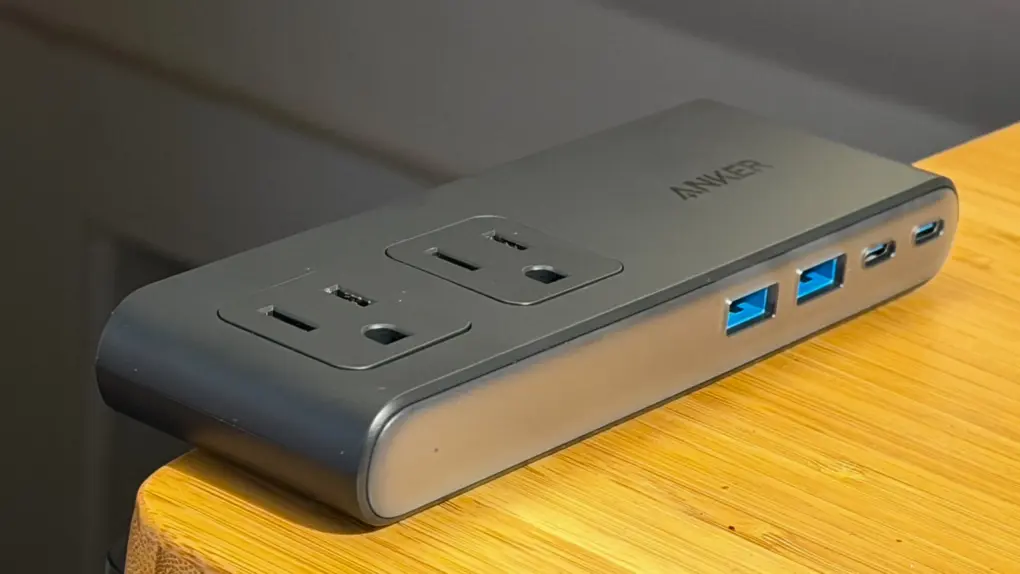
Anker’s new Nano Power Strip (10-in-1, 70W, Clamp) thoughtfully reinvents one of the world’s most common electrical accessories to make it play nice with desks.
It comes with some caveats, but for anyone needing to tame cable clutter, it makes a solid addition to a setup.
This post contains affiliate links. Cult of Mac may earn a commission when you use our links to buy items.
Anker Nano Power Strip (10-in-1, 70W, Clamp) review
The humble power strip has been around for decades, giving homeowners and gadget junkies a way to turn a single electrical outlet into three, six or more. Recent innovations include adding USB ports for charging modern gadgets (like iPhones or AirPods) and coming up with new form factors for specific uses.
The Anker Nano Power Strip (10-in-1, 70W, Clamp) sets its sights on gamers and neat freaks who want to make their power-hungry desktop setups as tidy as possible.
Anker reinvents the power strip with a desk-friendly design. It puts six AC outlets, two USB-C outlets and two USB-A outlets right where you need them.
- Extremely sturdy clamp holds power strip solidly in place on desk or table
- 6 power outlets: 2 on top, 4 hidden discreetly below your desk's surface
- 1,500-joule surge protector
- Plastic enclosure probably won't make you weak in the knees
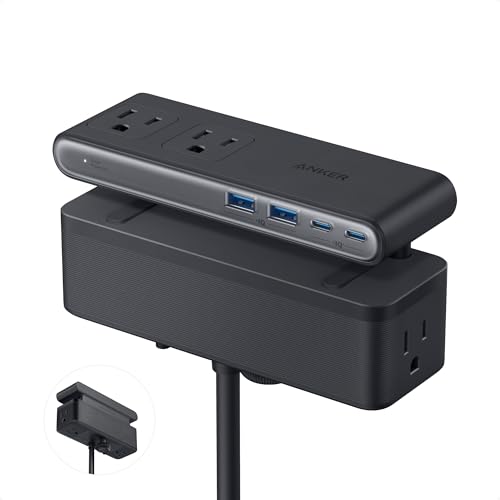
Table of contents: Anker Nano Power Strip (10-in-1, 70W, Clamp) review
- It’s all about the clamp
- Above the desk: 2 AC outlets, 2 USB-C and 2 USB-A
- Below the desk: 4 more AC outlets and that glorious clamp
- Power output
- Conclusion and pricing
It’s all about the clamp
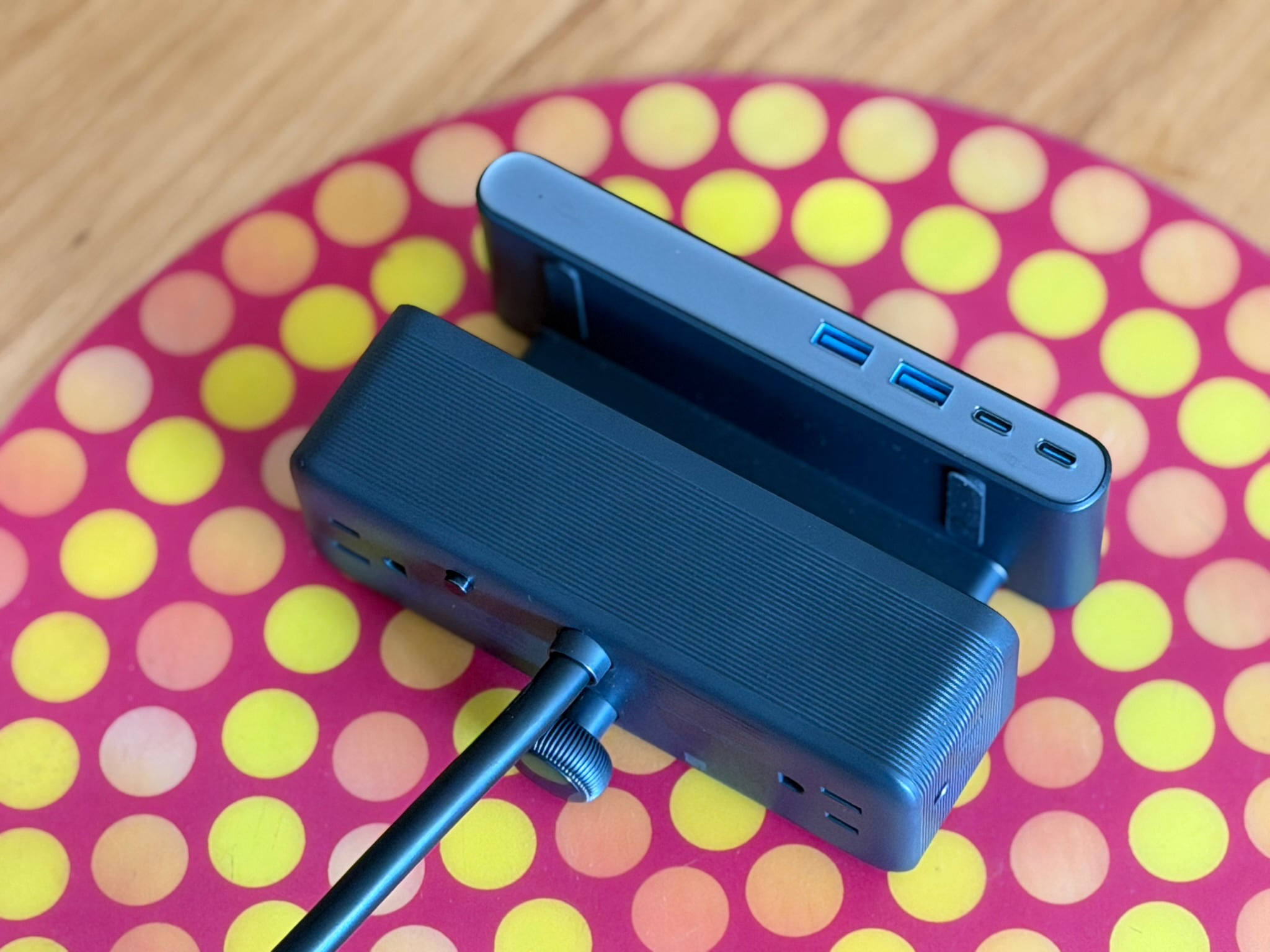
Photo: Lewis Wallace/Cult of Mac
Aside from “Power Strip,” the two most important parts of the product’s weird name are “10-in-1” and “Clamp.”
The first refers to the number of things you can plug in — Anker’s latest office accessory packs six electrical outlets, plus four USB ports (two USB-C and two USB-A).
The second, and perhaps most important, refers to the refined clamping mechanism that holds the power strip firmly in place on the edge of a desk. The clamp’s twin jaws come with silicone pads on their inner faces that serve two purposes.
First, they enable a secure installation, so the power strip won’t budge after you attach it to your desk. Anker brags about stable one-hand operation, and it’s true. Unlike a typical power strip, this sucker sits so stably on the edge of your desk that you can easily unplug something single-handedly.
Secondly, the silicone cushions the clamp’s bite so it won’t damage your desk. That’s important if you splurged on a sweet standing desk with a gorgeous bamboo top, or if you just want to move the power strip around from time to time to accommodate different equipment.
The clamp itself operates quite beautifully, with a very smooth feel as you twist the knurled knob to tighten it. It’s miles more sophisticated than the common (and typically infuriating) C-clamps that some similar products use.
This premium clamping action allows you to attach the power strip quickly and cleanly to your desk — and it holds the unit in place quite securely. You can easily plug and unplug things without the Nano Power Strip as much as wobbling. It proves surprisingly delightful.
Above the desk: 2 AC outlets, 2 USB-C and 2 USB-A
When attached to your desk, only a slender portion of the Anker Nano Power Strip (10-in-1, 70W, Clamp) remains visible. That part measures roughly 2 inches deep by 6 inches wide and 0.75 inches tall. On the front, the four USB ports sit to the right. A tiny green LED on the left indicates the unit is plugged in.
The look of the power strip doesn’t knock me out. The body consists of black plastic, with a grayish-silver face. (Anker makes a white version, too.) Anker touts the desk accessory’s “refined matte surface,” but to me, it looks and feels like a Dell laptop. As an Apple fan, I’d prefer an aluminum enclosure, at least for the top portion of the power strip.
As for the electrical outlets, Anker placed two on the top left side of the Nano Power Strip for easy access to desktop accessories. These pop up a quarter of an inch or so when you plug something into them because … I’m not sure why, TBH.
Below the desk: 4 more AC outlets and that glorious clamp
The rest of the electrical outlets sit on the bulkier bottom section of the Anker Nano Power Strip (10-in-1, 70W, Clamp), hidden below the surface of your desk. Two of them are on the very bottom; cords plugged into them hang straight down toward the floor. The final two take up either end of the power strip’s bottom section, so the cables point out parallel to the surface of your desk.
The novel arrangement enables some creative cable management. And while Anker promotes it as a desk accessory, it clearly could work on a compatible table in your living room, bedroom, etc. Anker says it works with desks between 0.6 inches and 1.8 inches thick, made of multiple materials (although the company recommends against using it with glass desktops).
Whether it will work for you and your particular setup is a personal question. It all depends on your setup, your power needs and where your electrical outlets are.
Finally, the power strip’s hefty black power cable measures 5 feet long. I think a braided cable would give the power strip a more luxurious feel, but it’s hidden below your desk anyway. However, as a person who uses a standing desk, I definitely appreciate the power cord’s generous length.
Power output
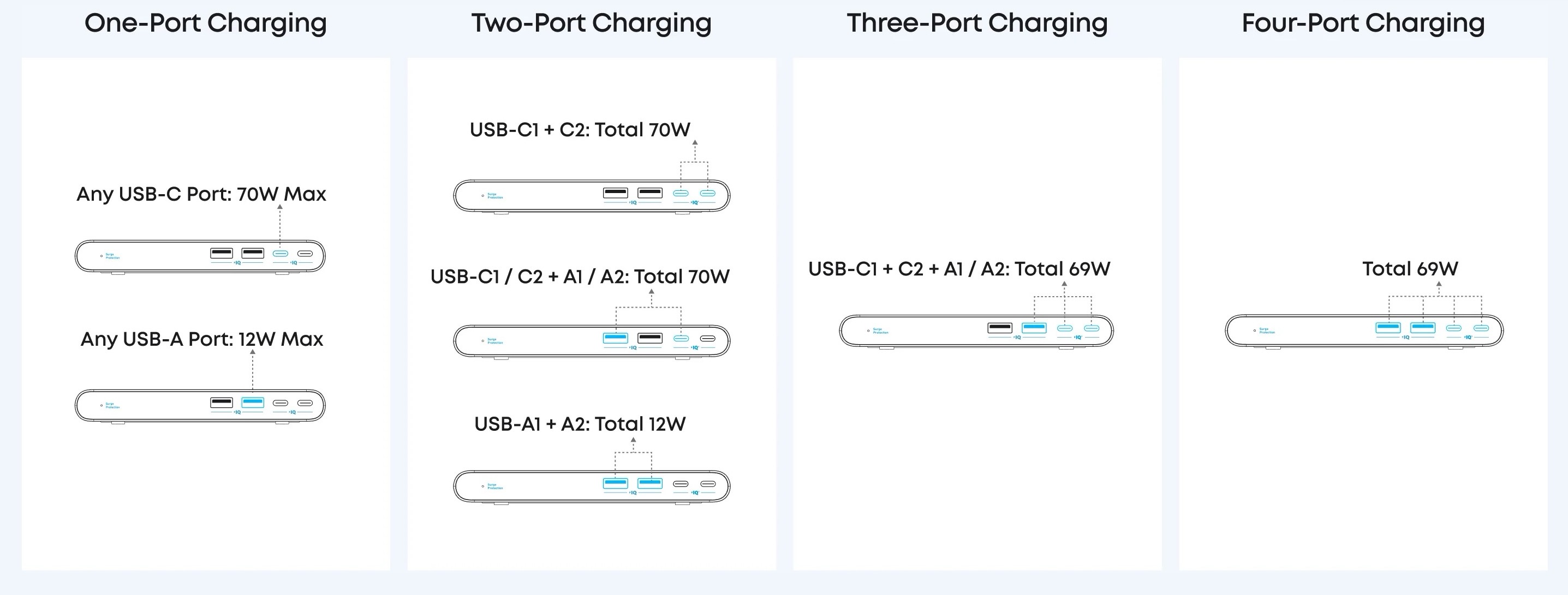
Image: Anker
As usual, the amount of power that flows from any of the four USB ports varies depending on how many are in use and what’s plugged into them. The USB-C ports max out at 70W when used alone; use them both at once, and you get a total of 70W, divided between them. (See the chart above for an easy explanation of which ports can deliver how much power in any given usage scenario.)
Anker pegs the power strip’s AC output at 1,875W, and I have no reason to doubt it. Nothing I plugged in caused a problem or tripped the power strip’s 1,500-joule surge protection. (A reset button pops out of the bottom of the power strip after power has been cut off, Anker says, and you simply press it back in to resume normal operation. I didn’t test the functionality for obvious reasons.)
Conclusion and pricing: Anker Nano Power Strip (10-in-1, 70W, Clamp) review
The Anker Nano Power Strip (10-in-1, 70W, Clamp) retails for $69.99. That’s pricier than your typical plug strip, but the exquisite clamping mechanism makes it a solid addition to a desk or table.
If its layout works for your setup, and you can get past the black plastic design, it provides a great way to tame cable clutter.
★★★★☆
Anker reinvents the power strip with a desk-friendly design. It puts six AC outlets, two USB-C outlets and two USB-A outlets right where you need them.
- Extremely sturdy clamp holds power strip solidly in place on desk or table
- 6 power outlets: 2 on top, 4 hidden discreetly below your desk's surface
- 1,500-joule surge protector
- Plastic enclosure probably won't make you weak in the knees
Anker provided Cult of Mac with a review unit for this article. See our reviews policy, and check out more in-depth reviews of Apple-related items.

Lewis Wallace is the managing editor of Cult of Mac and author of our weekly newsletter, The Weekender.
He’s a San Francisco-based writer and editor specializing in technology and culture. He loves his iPhone, hates Siri, and appreciates any hardware that combines form and function.
Prior to Cult of Mac, he juggled words and ideas as culture editor at Wired.com, homepage editor at TechTV, news product manager at NBCi, copy editor at PC World, reporter at The (Hayward) Daily Review and editor in chief of EveryBody’s News in Cincinnati.
He earned a bachelor of general studies degree with a journalism certificate from the University of Cincinnati. While in school, he worked as the entertainment editor of The News Record and as editor in chief of Clifton Magazine.
He’s also a bass player, who’s recorded and performed around the United States with Those Darn Accordions, The Electric Boogie Dawgz and The Mad Maggies. When not writing, editing or laying down bass lines, he plays darts and serves on the board of the San Francisco Darts League.

