The BasicClips app gives you one place to save everything you find online. The developer, Basic Apple Guy, calls BasicClips “the all-in-one place to collect and organize links, images, and all the other things you come across on the web and want to save for later.”
It’s free for all, and works on iPhone, iPad and Mac.
BasicClips makes saving links quick
The internet is brimming with things worth saving. Often, the problem is finding them again. From browser bookmarks and open tabs to screenshots, notes and links buried in various apps, useful information has a way of disappearing into the digital clutter. BasicClips is designed to fix that by turning your saved discoveries into a searchable, organized library across your Apple devices.
It does something far smarter than simply collecting URLs and images, though. It recognizes what you’ve saved and builds custom cards with relevant details, whether you’re clipping a recipe, a news story, a job listing or a research paper. With iCloud syncing, no need for an account or subscription, and even a little personality in its playful designs, BasicClips makes it easy to get organized.
Basic Apple Guy, the indie developer best known for his wallpapers, introduced the app Monday in a blog post.
The idea is simple. Saved items end up trapped in different apps like Safari, News, Messages and Reminders. BasicClips gathers everything into one library.
“BasicClips started as a bespoke solution to how I use my own devices,” Basic Apple Guy wrote. “Over the course of hundreds of hours of working on it, tweaking things, adding features, and refining the experience, it eventually became something I felt was worth sharing with others.”
Designed to be simple to use
Saving items in BasicClips takes just two clicks. Press the plus button, and a copied link will fill automatically. You can add a note, title, tag or folder to it, or simply hit Save. The developer calls the button “obnoxiously large.”
On a Mac, a menu bar app lets you save things without opening the main window. A share sheet extension covers Mac, iPhone and iPad, and everything syncs through iCloud. As per the App Store listing, Shortcut actions and Spotlight indexing are in the mix, too.
BasicClips figures out what you saved
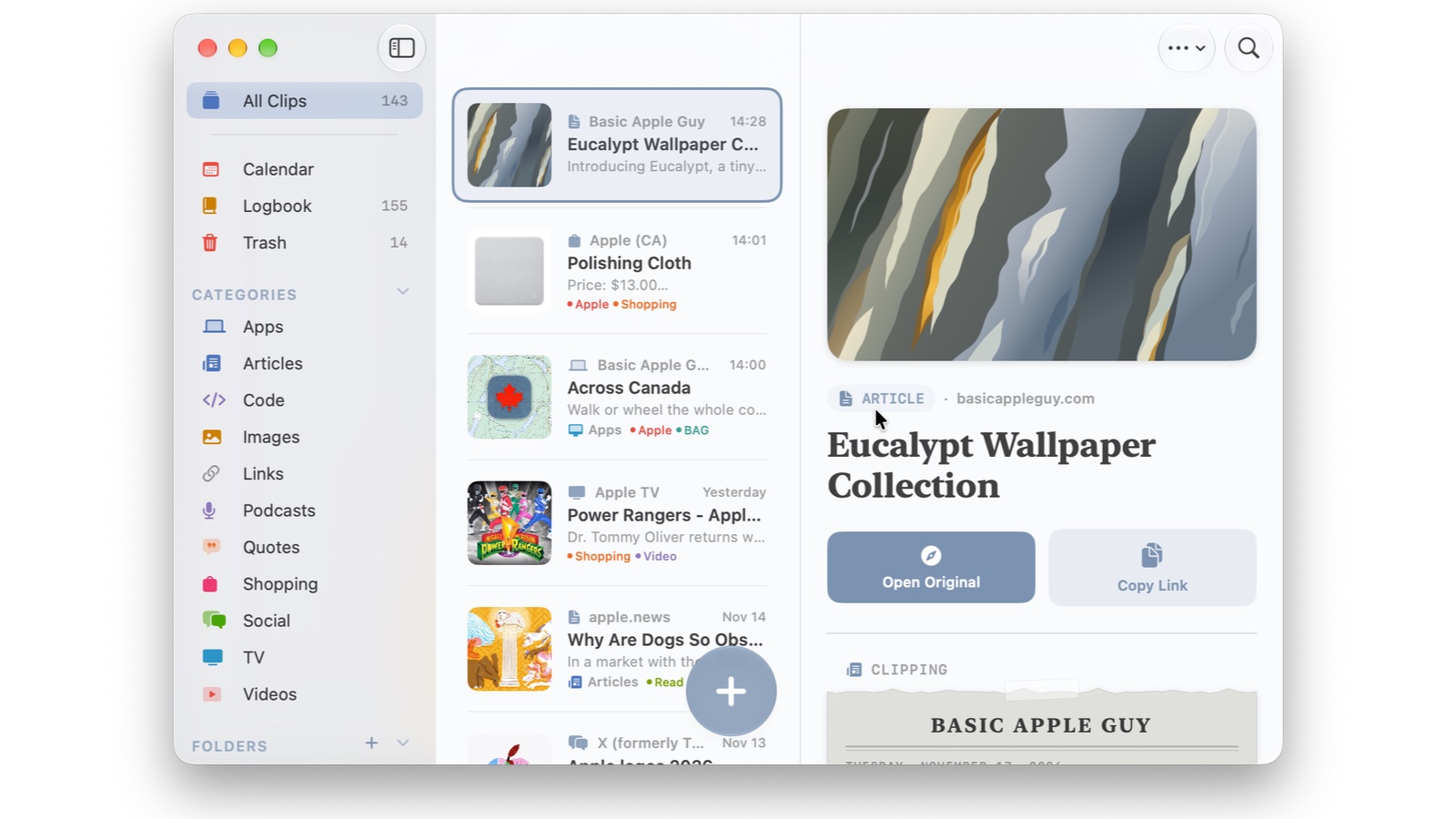
Photo: Basic Apple Guy
In the background, BasicClips tries to work out what each link is. It does so using Apple’s LinkPresentation framework to fetch details. Save a song from Apple Music, and it can pull in artwork, artist, album, genre and duration.
A social post can bring in the author, likes, replies and publish date. Similarly, news articles show a source, author and description.
At launch, the app supports 31 content types, including articles, recipes, movies, books, PDFs, travel and games. If BasicClips guesses the category wrong, you can change it with a single click.
On supported devices, you can also get an on-device Apple Intelligence-generated summary of an article.
Folders, tags and a LogBook keep things organized
BasicClips lets you sort clips into folders, with each one having its own color and icon. Tags add a layer on top, and a calendar view shows what you saved each day.
Done with a clip? You can choose to either delete it or log it. Logging moves it out of All Clips and adds a date stamp. (Logged clips remain searchable.) Prefer a hands-off approach? Unsorted clips can auto-delete after 30, 60 or 90 days.
BasicClips leans hard into whimsy
Clips don’t look like boring rows of text. Articles appear as newspaper clippings. Recipes show up as index cards. Travel clips look like boarding passes while books resemble library checkout cards.
The app also has a stats page with levels for your saving habits. The developer says it might also be the first bookmarking app with levels. If you don’t like whimsy, a single toggle in Settings turns it all off.
The app ships with 25 themes at launch, all free. Basic Apple Guy says he will add new theme collections seasonally.
The developer says BasicClips is vibe-coded
Basic Apple Guy is upfront about the fact that he vibe-coded the app.
“I want to be fully transparent about that, and if you’re someone who has strong feelings against using vibe-coded apps, I completely understand and respect that,” Basic Apple Guy wrote.
For those people, he points out that there are plenty of other bookmarking and save-it-later apps that aren’t vibe-coded. Still, he encourages people to give BasicClips a shot before dismissing it as vibe-coded slop.
“I hope that if you decide to give it a try, you’ll see that despite the vibe-coding of it all, how much love and care went into making it,” he wrote. “I’ve spent countless hours obsessing over little details, refining how things look and function, adding features, and adjusting things down to the pixel. I know that doesn’t change how the app was made, but I hope the care that went into it comes through when you use it.”
Where to download it
BasicClips is free on the App Store for iPhone, iPad and Mac. It requires iOS 26, iPadOS 26 or macOS 26 or later. Basic Apple Guy says he spent weeks tuning the app for iPhone Duo, and a Vision Pro version is in the works.
There are no in-app purchases, and anyone who wants to support the project can toss some money in the tip jar on Basic Apple Guy’s website. The App Store privacy label says the developer collects no data.
If you’ve got a graveyard of open tabs, this one’s worth a download.
Download: BasicClips on the App Store

Anurag Chawake is a tech-focused writer specializing in smartphones, apps and consumer technology. His interest in computers began during the Windows 98 era, eventually leading him to explore everything from operating systems to mobile devices and PC hardware. Anurag previously contributed to The Indian Express, covering Apple, Android, gaming and the broader technology landscape.